# Introduction

Learn about Decentraweb's Decentralized Domain Name System including Top-Level Web3 Domains, Web3 Domains & Web3 Subdomains

Decentraweb facilitates the use of the blockchain to champion a decentralized future of the internet.

Decentraweb's revolutionary, decentralized platform takes back the internet and DNS (Domain Name System) from the gatekeepers - allowing anyone to permissionlessly create their own decentralized domains on the Ethereum or Polygon Blockchains.

Decentraweb powers three levels of Decentralized Domains on the Ethereum & Polygon Blockchains

<figure><img src="https://803738250-files.gitbook.io/~/files/v0/b/gitbook-x-prod.appspot.com/o/spaces%2FVtO5fXlAonsdE5E274CH%2Fuploads%2F2DP2Vvrp3a9p4qYTHNWn%2FFrame%202039.png?alt=media&amp;token=aa020d1c-a8c0-4f7d-b94d-a70318876c58" alt=""><figcaption></figcaption></figure>

Owners of any level Decentraweb Domain can use their Decentralized Domain as their Wallet Address for over 150 cryptocurrencies, as their decentralized website address, as their decentralized chat handle and more.

***

### Top-Level Web3 Domains

**Decentraweb is proudly the leading supplier of Top-Level Web3 Domains (Web3 TLDs), with over 13,000 Web3 TLDs registered within our ecosystem.**

<figure><img src="https://803738250-files.gitbook.io/~/files/v0/b/gitbook-x-prod.appspot.com/o/spaces%2FVtO5fXlAonsdE5E274CH%2Fuploads%2FFzak1OZOns4OlGQnlcLa%2FFrame%202038%20(4).png?alt=media&amp;token=bedc3f32-4509-41fc-bb6c-2b3e11d56805" alt=""><figcaption></figcaption></figure>

All users can register Web3 TLDs using alphabetical, numerical and special characters in addition to emojis via our DNS platform, with the exception of ICANN registered TLDs such as .com or .org

Anyone can register a Top-Level Web3 Domain with Decentraweb from $50/yr using $DWEB Tokens or $100/yr using Ethereum for Ethereum Registrations or WETH for Polygon registrations

[**Register your Top-Level Web3 Domain →**](https://dns.decentraweb.org)<br>

Owners of Web3 TLDs can utilize our core protocol utility by :&#x20;

* **Selling Web3 Domain Registrations through Domain Staking**\
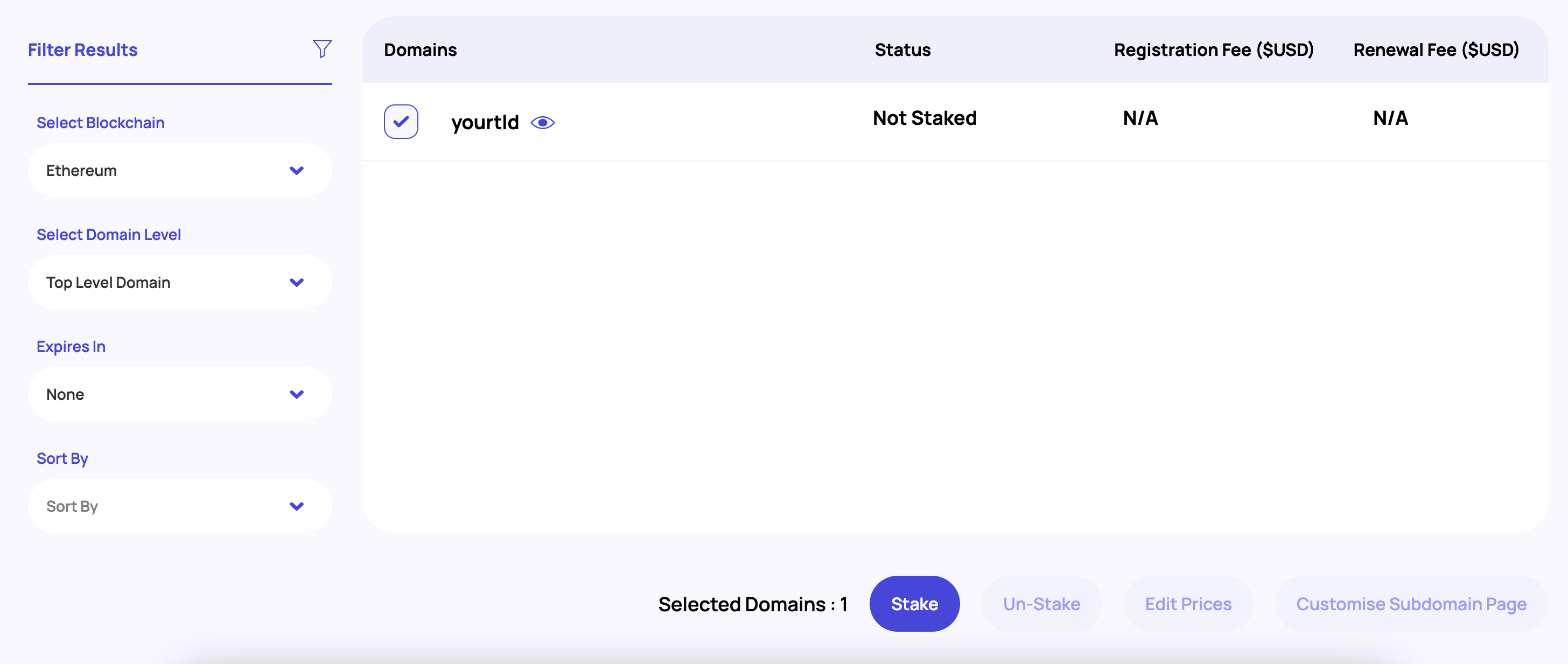
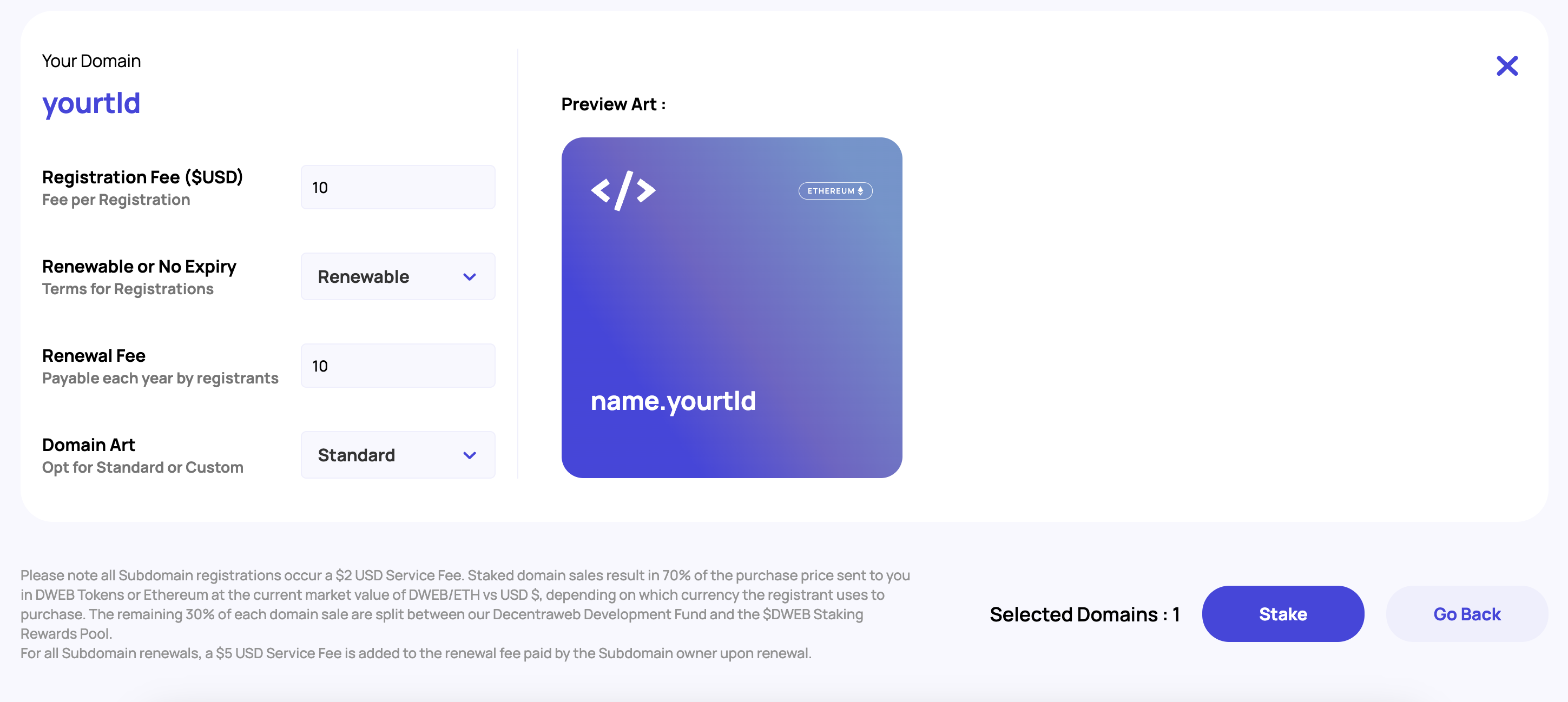
  Stake your Web3 TLDs, setting registration fees and optional renewal fees, to allow other users to register Web3 Domains using your Web3 TLDs. Registration and Renewal fees are sent directly to your wallet, as the owner of the Web3 TLD used for Web3 Domain registrations/renewals minus protocol fees<br>
* **Registering Unlimited Web3 Domains using your Web3 TLD**\
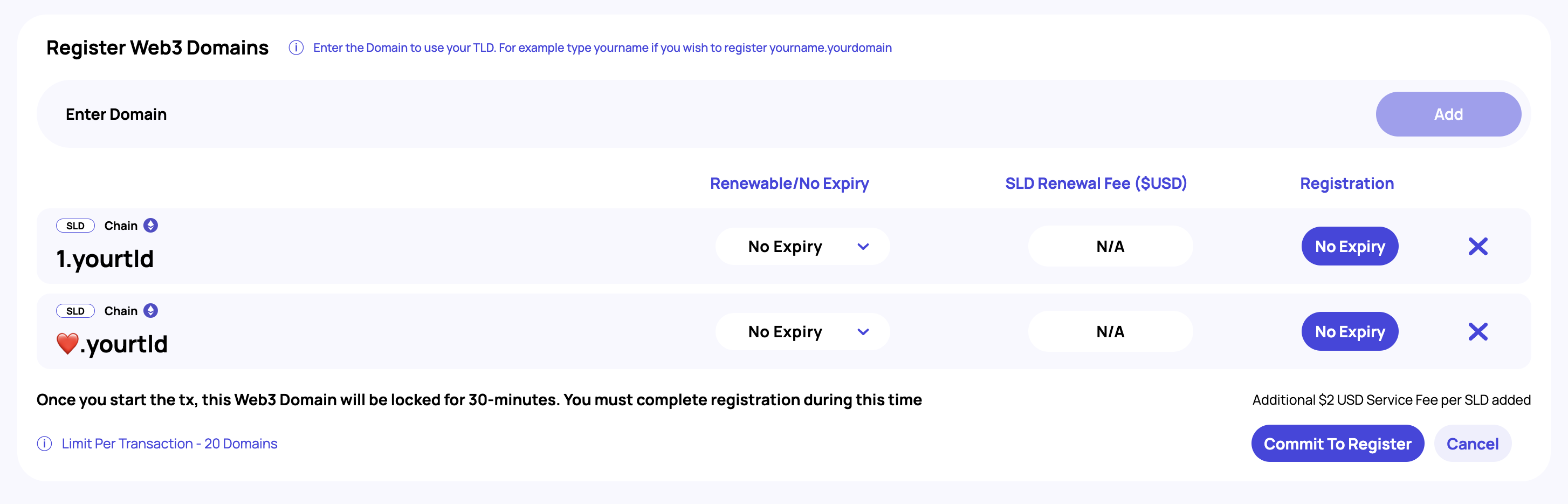
  Register unlimited Web3 Domains from your Web3 TLD within our DNS platform. Through registration you will mint your Web3 Domains as ERC721 NFTs which can be traded on any NFT marketplace or used as Web3 Domains.<br>
* **Reserving Unlimited Web3 Domains using your Web3 TLD**\
  Opt to reserve unlimited Web3 Domains from your Web3 TLDs to disallow others from registering your reserved Web3 Domains. For example, if you owned .234 as a Web3 TLD, you may wish to disallow 1.234 from being registered.<br>
* **Selling Exclusive Web3 Domain Registrations through Private Web3 TLD Staking**\
  Opt to Privately Stake your Web3 TLDs and allow exclusive access to register Web3 Domains using your Web3 TLD to selected wallet addresses or based on ownership of a token from nominated ERC20 or ERC721/A contracts<br>
* **Using your Web3 TLD as your Web3 Identity**\
  Owners of Web3 TLDs can resolve their wallet address and set DNS records to their Web3 TLD in the same way they can with any lower hierarchal domains. Use as your Decentralized Domain for your Wallet Address for over 150 cryptocurrencies, as your decentralized website address, as your decentralized chat handle and more. For example, if you owned .steve, you can resolve .steve as your Web3 Domain for your wallet address, or use .steve as your decentralized chat handle.<br>

***

### Web3 Domains

**Decentraweb is proudly powering over 475,000 Web3 Domains registered against community owned Web3 TLDs**

<figure><img src="https://803738250-files.gitbook.io/~/files/v0/b/gitbook-x-prod.appspot.com/o/spaces%2FVtO5fXlAonsdE5E274CH%2Fuploads%2FdmlRbw5cYl9eispcoFs1%2FFrame%202038%20(5).png?alt=media&amp;token=fe66387b-daa9-4175-a234-5e260e7b72be" alt=""><figcaption></figcaption></figure>

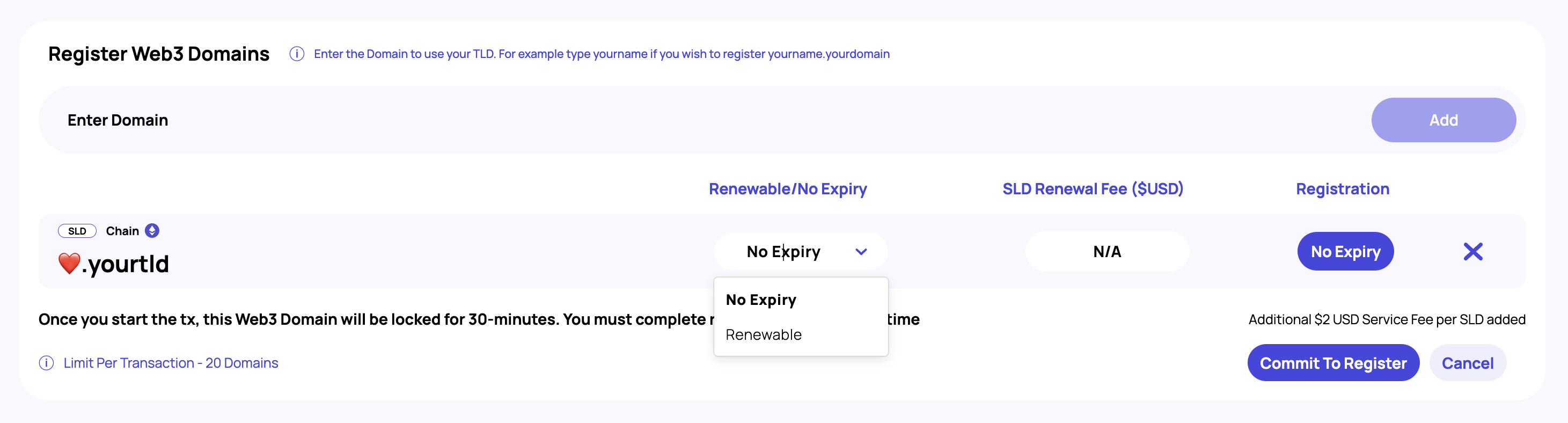
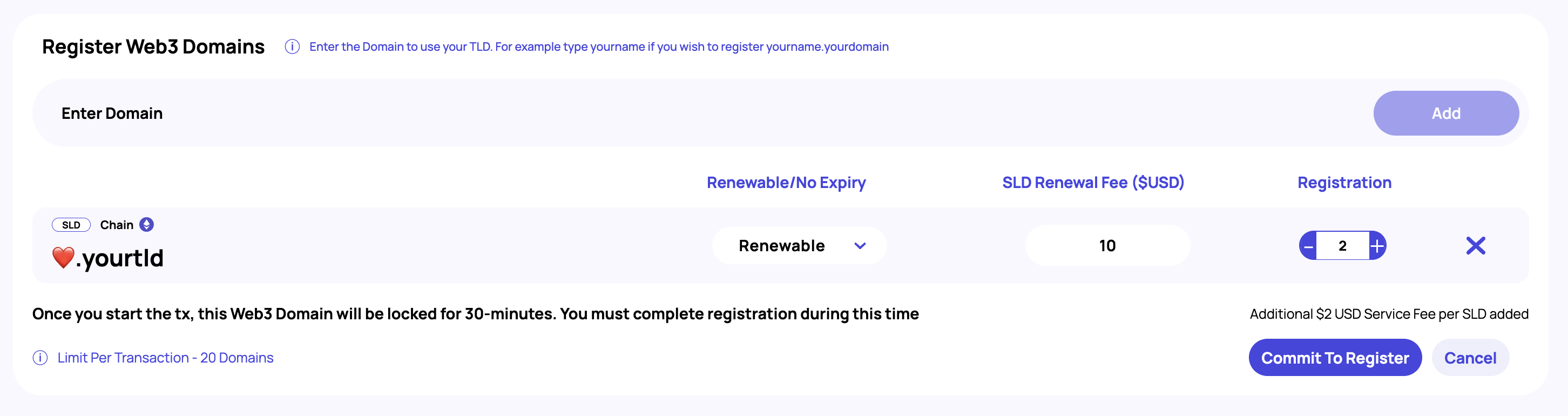
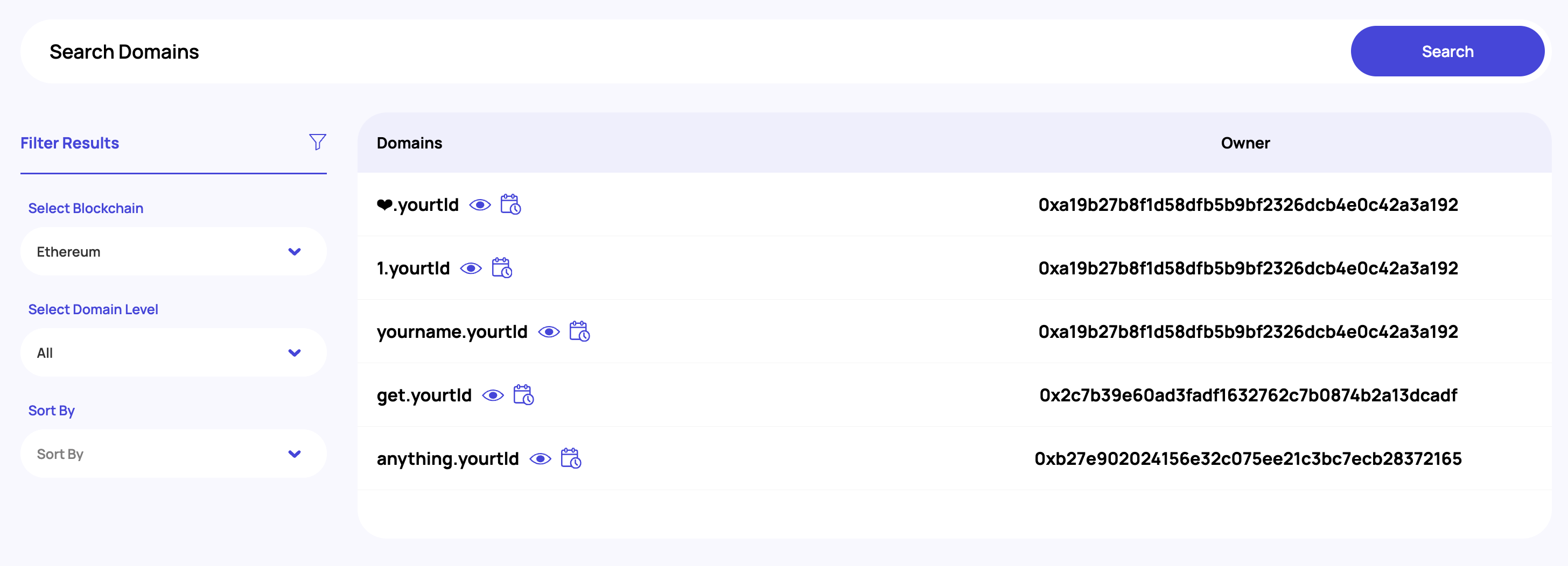
All users can register their own Web3 Domains from any Web3 TLD which has been staked by its owner. When registering a Web3 Domain, the registration fee and terms (renewable or no-expiry) have been set by the Web3 TLD owner and at time of registration have **locked terms**.

[**Search for your Web3 Domain →**](https://dns.decentraweb.org/sld)

{% hint style="info" %}
**Locked terms** means if you register a Web3 Domain from a Web3 TLD that has no-expiry (is expiry-less) at time of registration, and the Web3 TLD owner changes for new registrations to occur a renewal fee, because you registered when registrations provided Web3 Domains with no-expiry, your Web3 Domain will continue to have no expiration date.\
\
This is also the case if you register a Web3 Domain with for example a $10 yearly renewal fee and the Web3 TLD owner changes this to be a $50 renewal fee. As you registered at a time when the renewal fee was $10, your yearly renewal fees will continue to be $10.
{% endhint %}

Owners of Web3 Domains can utilize our core protocol utility by :&#x20;

* **Selling Web3 Subdomain Registrations through Domain Staking**\
  Stake your Web3 Domains, setting registration fees and optional renewal fees, to allow other users to register Web3 Subdomains using your Web3 Domains. Registration and Renewal fees are sent directly to your wallet, as the owner of the Web3 Domain used for Web3 Subdomain registrations/renewals minus protocol fees<br>
* **Registering Unlimited Web3 Subdomains using your Web3 Domain**\
  Register unlimited Web3 Subdomains from your Web3 Domains within our DNS platform. Through registration you will mint your Web3 Subdomains as ERC721 NFTs which can be traded on any NFT marketplace or used as Web3 Domains.<br>
* **Reserving Unlimited Web3 Subdomains using your Web3 Domain**\
  Opt to reserve unlimited Web3 Subdomains from your Web3 Domains to disallow others from registering your reserved Web3 Subdomains. For example, if you owned 1.234 as a Web3 Domain, you may wish to disallow 0.1.234 from being registered.<br>
* **Using your Web3 Domain as your Web3 Identity**\
  Resolve your Web3 Domain against your Wallet Address for over 150 cryptocurrencies, use as your decentralized website address, your decentralized chat handle and more.

***

### Web3 Subdomains

<figure><img src="https://803738250-files.gitbook.io/~/files/v0/b/gitbook-x-prod.appspot.com/o/spaces%2FVtO5fXlAonsdE5E274CH%2Fuploads%2FQZkAByts4Xet6twO1iwP%2FFrame%202038%20(6).png?alt=media&amp;token=b9f514c5-5b1f-4123-8965-08efc8e509fd" alt=""><figcaption></figcaption></figure>

All users can register their own Web3 Subdomains from any Web3 Domain which has been staked by its owner. When registering a Web3 Subdomain, the registration fee and terms (renewable or no-expiry) have been set by the Web3 Domain owner and at time of registration have **locked terms**.&#x20;

{% hint style="info" %}
**Locked terms** means if you register a Web3 Subdomain from a Web3 Domain that has no-expiry (is expiry-less) at time of registration, and the Web3 Domain owner changes for new registrations to occur a renewal fee, because you registered when registrations provided Web3 Subdomains with no-expiry, your Web3 Subdomain will continue to have no expiration date.\
\
This is also the case if you register a Web3 Subdomain with for example a $10 yearly renewal fee and the Web3 Domain owner changes this to be a $50 renewal fee. As you registered at a time when the renewal fee was $10, your yearly renewal fees will continue to be $10.
{% endhint %}

Owners of Web3 Subdomains can utilize our core protocol utility by :&#x20;

* **Using your Web3 Subdomain as your Web3 Identity**\
  Resolve your Web3 Subdomain against your Wallet Address for over 150 cryptocurrencies, use as your decentralized website address, your decentralized chat handle and more.


# Official Links

Please use our official links to stay safe

### Main Platforms

<table><thead><tr><th width="267">Name</th><th>URL</th></tr></thead><tbody><tr><td>Official Website</td><td><a href="https://decentraweb.org">https://decentraweb.org</a></td></tr><tr><td>DNS Platform</td><td><a href="https://dns.decentraweb.org">https://dns.decentraweb.org</a></td></tr><tr><td>$DWEB Staking Portal</td><td><a href="https://staking.decentraweb.org">https://staking.decentraweb.org</a></td></tr></tbody></table>

### Social Media & Community

<table><thead><tr><th width="268">Name</th><th>URL</th></tr></thead><tbody><tr><td>Discord</td><td><a href="https://discord.gg/decentraweb">https://discord.gg/decentraweb</a></td></tr><tr><td>Twitter</td><td><a href="https://twitter.com/decentra_web">https://twitter.com/decentra_web</a></td></tr></tbody></table>

### $DWEB

<table><thead><tr><th width="267">Name</th><th>URL</th></tr></thead><tbody><tr><td>$DWEB Ethereum Mainnet</td><td><a href="https://etherscan.io/token/0xE7f58A92476056627f9FdB92286778aBd83b285F">0xe7f58a92476056627f9fdb92286778abd83b285f</a></td></tr><tr><td>$DWEB Polygon Mainnet</td><td><a href="https://polygonscan.com/token/0x8839e639f210b80ffea73aedf51baed8dac04499">0x8839e639f210b80ffea73aedf51baed8dac04499</a></td></tr><tr><td>UniSwap</td><td><a href="https://app.uniswap.org/#/swap?inputCurrency=ETH&#x26;outputCurrency=0xe7f58a92476056627f9fdb92286778abd83b285f">UniSwap Pool</a></td></tr><tr><td>QuickSwap</td><td><a href="https://quickswap.exchange/#/swap?inputCurrency=0x0d500b1d8e8ef31e21c99d1db9a6444d3adf1270&#x26;outputCurrency=0x8839e639f210b80ffea73aedf51baed8dac04499">QuickSwap Pool</a></td></tr><tr><td>CoinMarketCap</td><td><a href="https://coinmarketcap.com/currencies/decentraweb/">CoinMarketCap</a></td></tr><tr><td>CoinGecko</td><td><a href="https://www.coingecko.com/en/coins/decentraweb">CoinGecko</a></td></tr></tbody></table>

### Resolvers & Gateways

<table><thead><tr><th width="269">Name</th><th>URL</th></tr></thead><tbody><tr><td>ETH Resolver</td><td><a href="https://resolver.decentraweb.org/dns-query">https://resolver.decentraweb.org/dns-query</a></td></tr><tr><td>DWEB IPFS Gateway</td><td><a href="https://ipfs.decentraweb.org/ipfs/bafybeifq6kpf3zybrk4dhhmeg7xc2kjlw2l4mhgfjkmmhaj4uszwf7hfse">https://ipfs.decentraweb.org/ipfs/bafybeifq6kpf3zybrk4dhhmeg7xc2kjlw2l4mhgfjkmmhaj4uszwf7hfse</a></td></tr></tbody></table>

### Decentraweb Opensource Library

Decentraweb JavaScript SDK: <https://github.com/decentraweb/decentrawebjs>

Decentraweb Redis Cache : <https://github.com/decentraweb/decentraweb-live-cache>


# Decentraweb Deployments

Mainnet and Testnet Contracts

Discover our Contract Addresses for Ethereum and Polygon networks

**Ethereum Mainnet**

<table><thead><tr><th width="253">Name</th><th>Contract Address</th></tr></thead><tbody><tr><td>$DWEB Token</td><td>0xE7f58A92476056627f9FdB92286778aBd83b285F</td></tr><tr><td>Decentraweb Registry</td><td>0x8eb93AB94A6Afa8d416aB1884Ebb5A3f00920a7A</td></tr><tr><td>Default Reverse Resolver</td><td>0x7d770Cfe9608Ff3AA3F5A34bdCd27c3870a370Da</td></tr><tr><td>Public Resolver</td><td>0xf157D3559DF1F8c69cb757A1A2cdF8736618E083</td></tr><tr><td>Reverse Registrar</td><td>0x3D8f878584199e47a2d40A1E269042E10aa50754</td></tr><tr><td>Root Registrar Controller</td><td>0xcCbCa4F9651Ef122D58d7EC5acCa27D806840209</td></tr><tr><td>$DWEB Staking</td><td>0x7aA1f1A3c2BBfB7802313b6f18a2fc408A030564</td></tr></tbody></table>

**Ethereum Testnet (Goerli)**

<table><thead><tr><th width="253">Name</th><th>Contract Address</th></tr></thead><tbody><tr><td>$DWEB Token</td><td>0x174db1922A6De366E253084ce7912463E57C11ae</td></tr><tr><td>Decentraweb Registry</td><td>0x33564B7b69E385615Db1e26A0fF917F3B2992c87</td></tr><tr><td>Default Reverse Resolver</td><td>0xfF2e022F4D45ef8D4c7eA73f4dE2D63C8d437F2e</td></tr><tr><td>Public Resolver</td><td>0xfE3146317183cBdebDeE12c3584141Fb15a80668</td></tr><tr><td>Reverse Registrar</td><td>0xA6E4607755F1cbF45E6f9e0840d3Be3075F3d729</td></tr><tr><td>Root Registrar Controller</td><td>0x94281bc70d6D62cc1DEb81A44b62cc7Fa22B10be</td></tr></tbody></table>

**Matic (Polygon) Mainnet**

<table><thead><tr><th width="253">Name</th><th>Contract Address</th></tr></thead><tbody><tr><td>$DWEB Token</td><td>0x8839e639F210B80ffea73AedF51baed8DAc04499</td></tr><tr><td>Decentraweb Registry</td><td>0x9f3eadf2360Dc4432a003699398169A2c7C10211</td></tr><tr><td>Default Reverse Resolver</td><td>0xeEc93022ec031d6AD2E35AA36edFE80d73F8808a</td></tr><tr><td>Public Resolver</td><td>0xEF2a00dc4ecA8174Bcf59dd8e124ba8f99307FF8</td></tr><tr><td>Reverse Registrar</td><td>0x662b0b6253e44F56DF387aCabd86A69D1e2A8cA9</td></tr><tr><td>Root Registrar Controller</td><td>0x38CcdB2660C63374e475090aAbE4F8339Cf4232E</td></tr><tr><td>$DWEB Staking</td><td>0x5DB2dE06eD6797E180cD432Ff0BeC6332a34C18E</td></tr></tbody></table>

**Matic (Polygon) Testnet (Mumbai)**

<table><thead><tr><th width="253">Name</th><th>Contract Address</th></tr></thead><tbody><tr><td>$DWEB Token</td><td>0x2Bdd2aC5329579FE1E4110b88Cbb9c43445D13ac</td></tr><tr><td>Decentraweb Registry</td><td>0x7237E2188Ce96925E28654AF34Fa6b0937Ef4575</td></tr><tr><td>Default Reverse Resolver</td><td>0x73a29347BFECa3fDDD5354B75E02A10B2E718407</td></tr><tr><td>Public Resolver</td><td>0xfCea3D3353CFD21861D1dC1caE8aD39Db017ee73</td></tr><tr><td>Reverse Registrar</td><td>0x36E8A0f10c5C2d1ccE81974133cAE4F583daE3e9</td></tr><tr><td>Root Registrar Controller</td><td>0x957B1254c0944531C2fcE5a4d2C80Bf239574f1f</td></tr></tbody></table>


# Our SDKs


# About our SDKs

Learn about our open-sourced javascript SDK for integrating and interacting with our Decentralized Domain Name System

The Decentraweb JavaScript SDK enables websites and application to utilize Decentraweb's DDNS technology. Whether that's to convert Ethereum addresses to friendly DWEB identities, allow payments to DWEB handles, or even recreate and extend the functionality on <https://dns.decentraweb.org/>. \
\
**You can find the library on Github:**

{% embed url="<https://github.com/decentraweb/decentrawebjs>" %}

***

### Namekit

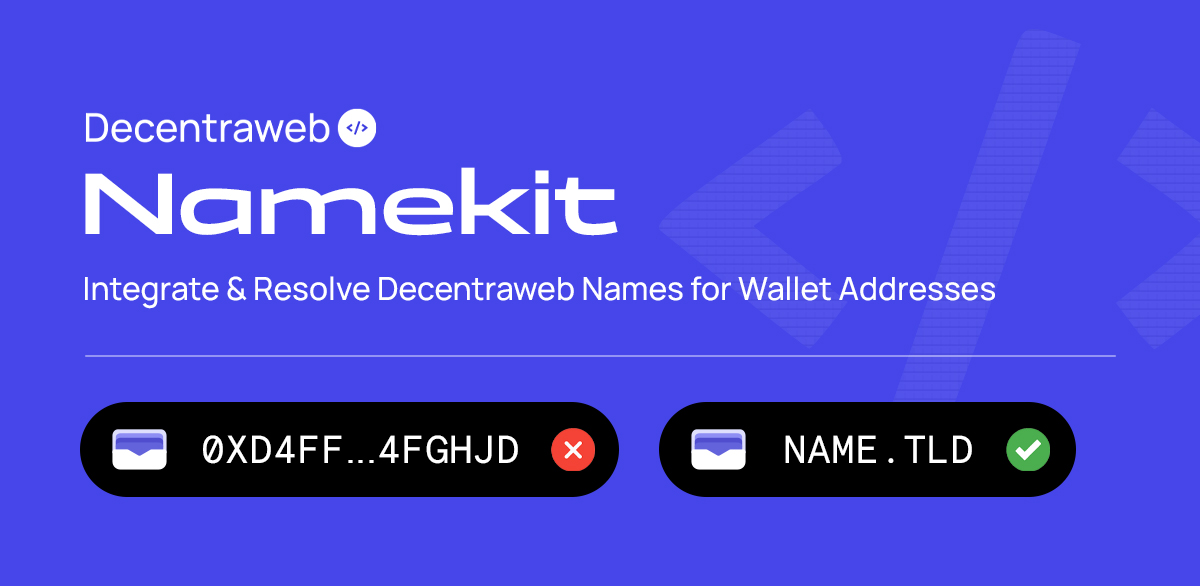
<figure><img src="https://803738250-files.gitbook.io/~/files/v0/b/gitbook-x-prod.appspot.com/o/spaces%2FVtO5fXlAonsdE5E274CH%2Fuploads%2FdFFq8BTaqf98fjrF5OVt%2Fnamekit.jpg?alt=media&amp;token=3526a4fa-a8f8-4b90-b5ea-c038bad90544" alt=""><figcaption></figcaption></figure>

For integrating and resolving Decentraweb Names within your website or app. Also supports ENS Domains and provides limited support for classic ICANN DNS System\
\
Providing tools for :&#x20;

* Reading of Decentraweb Domains ↔  Wallet Addresses

{% embed url="<https://docs.decentraweb.org/decentraweb/for-developers/our-sdk/namekit>" %}

***

### Core Library

<figure><img src="https://803738250-files.gitbook.io/~/files/v0/b/gitbook-x-prod.appspot.com/o/spaces%2FVtO5fXlAonsdE5E274CH%2Fuploads%2FuYeSmQ2sh4Sc9BVp4aQ6%2Fcore2.jpg?alt=media&amp;token=a5233c2e-205e-4e90-a025-43d07bbc2101" alt=""><figcaption></figcaption></figure>

Our Core Library allows developers to integrate fully with Decentraweb and interact with our Smart Contracts.

Providing tools for :&#x20;

* Reading and Setting Decentraweb Domain Records
* Reading and Setting DNS & Text Records for Decentraweb Domains
* Registering Web3 Domains (absolutely.anything) and Web3 Subdomains (wow\.absolutely.anything)

{% embed url="<https://docs.decentraweb.org/decentraweb/for-developers/our-sdk/core-full-integration>" %}

***

### Decentraweb Resolver Service

Our Resolver Service is an open-sourced library for using Decentraweb Domains as Decentralized Domains/Website URLs within browsers

{% embed url="<https://www.npmjs.com/package/@decentraweb/resolver>" %}

***

### Decentraweb CLI interface

A CLI interface library to interact with our smart contracts via command line instead of using our [DNS Platform](https://dns.decentraweb.org)

{% embed url="<https://www.npmjs.com/package/@decentraweb/cli>" %}


# Namekit

Learn how to seamlessly integrate Decentraweb names for wallet addresses into your website or dApp with our Namekit

<figure><img src="https://803738250-files.gitbook.io/~/files/v0/b/gitbook-x-prod.appspot.com/o/spaces%2FVtO5fXlAonsdE5E274CH%2Fuploads%2FdFFq8BTaqf98fjrF5OVt%2Fnamekit.jpg?alt=media&amp;token=3526a4fa-a8f8-4b90-b5ea-c038bad90544" alt=""><figcaption></figcaption></figure>

Our Namekit allows developers to integrate reading of Decentraweb Domain and ENS Domain Records allowing developers to utilise human-friendly domains against crypto wallet addresses

If you need to manage domain data/interact with our Smart Contracts you'll need to integrate our [Core Library](/decentraweb/for-developers/our-sdks/core-full-integration)

***

**View our NPM Package :**&#x20;

{% embed url="<https://www.npmjs.com/package/@decentraweb/namekit>" %}

***

### Domain Resolution Logic

Domain name provider is detected using following logic:

1. If domain name ends with `.eth` then it is resolved through ENS
2. If domain name TLD matches one of the ICANN TLDs, then it is resolved through regular DNS.
3. All other domains are resolved with DWEB contracts.

List of ICANN domains can be found [here](https://data.iana.org/TLD/tlds-alpha-by-domain.txt) and is updated regularly.

**Important Note:** This logic may change in the future.

***

### Installation

To install Decentraweb Namekit, run the following within your terminal to your project directory

```
npm install --save @decentraweb/namekit ethers@5
```

***

### Initialization&#x20;

Namekit uses [ethers.js](https://docs.ethers.io/v5/) to call Ethereum contracts. It is required as peer dependency.

Decentraweb supports both Ethereum and Polygon networks. Namekit will automatically detect which network to use based on where domain name is located currently. To initialize Namekit instance you need to pass Ethereum and Polygon network name (`mainnet` is used with 'matic' and `goerli` is used with 'maticmum') and ethers.js providers for each network

```javascript
import {providers, Wallet} from "ethers";
import DwebNamekit, {NamekitConfig} from "@decentraweb/namekit";

const ETH_NETWORK = 'goerli';
const ETH_JSONRPC_URL = 'https://goerli.infura.io/v3/00000000000000000000000000000000';
const POLYGON_NETWORK = 'maticmum';
const POLYGON_JSONRPC_URL = 'https://polygon-mumbai.infura.io/v3/00000000000000000000000000000000';
const config: NamekitConfig = {
  ethereum: {
    network: ETH_NETWORK,
    provider: new providers.JsonRpcProvider(ETH_JSONRPC_URL, ETH_NETWORK),
  },
  polygon: {
    network: POLYGON_NETWORK,
    provider: new providers.JsonRpcProvider(POLYGON_JSONRPC_URL, POLYGON_NETWORK)
  }
};
const namekit = new DwebNamekit(config);
```

Alternatively, if you use one of supported providers, you can initialize Namekit in a simpler way:

```javascript
const config: NamekitConfig = {
  apiProvider: 'infura', //Supported providers: 'etherscan', 'infura', 'alchemy', 'cloudflare', 'pocket', 'ankr'
  apiKey: '00000000000000000000000000000000', //
  production: false //If true, then mainnet and matic networks will be used, otherwise goerli and maticmum
};
const namekit = new DwebNamekit(config);
```

**Browser Bundle**

In most cases importing library using `npm` is preferred way, but for fast prototyping you can load it from our CDN:

```html
<script src="https://cdn.ethers.io/lib/ethers-5.7.umd.min.js" type="application/javascript"></script>
<script src="https://cdn.decentraweb.org/decentraweb-namekit-2.2.2.min.js" type="application/javascript"></script>
<script>
  window.addEventListener('load', async () => {
    const {DwebNamekit} = Decentraweb;
    const namekit = new DwebNamekit({
      ethereum: {
        network: 'mainnet',
        provider: ethers.getDefaultProvider('mainnet')
      },
      polygon: {
        network: 'matic',
        provider: ethers.getDefaultProvider('matic')
      }
    })
</script>
```

***

### Resolve Ethereum Address to Name

Ethereum address can be resolved through both Decentraweb and ENS contracts or through one specified system.

```javascript
const names = await namekit.address.resolve('0x4323E6b155BCf0b25f8c4C0B37dA808e3550b521');
/*
Returns:
[
  { provider: 'dweb', name: 'vitalik' },
  { provider: 'ens', name: 'vitalik.eth' }
]
*/
```

To query Decentraweb names only :&#x20;

```javascript
//To query Decentraweb only
const dwebName = await namekit.address.resolve('0x4323E6b155BCf0b25f8c4C0B37dA808e3550b521', 'dweb');
/*
Returns: 'vitalik'
*/
```

***

### Resolve Name to Ethereum Address

In this case Namekit will detect which domain name system name belongs to and will look for Ethereum address associated with given name. Note that classic domains will always return `null`.

```javascript
const address = await namekit.address.lookup('vitalik');
/*
Returns: '0x4323E6b155BCf0b25f8c4C0B37dA808e3550b521'
*/
```

***

### Reading Extended Domain Data

By calling `namekit.domain(domainName)` you can get instance of class that will allow to read extended data associated with domain name. Depending on domain name provider you will get either `DWEBDomain`, `ENSDomain` or `ICANNDomain` instance. Below you can see feature support table for different domain name systems.

|                | DWEB | ENS | ICANN |
| -------------- | ---- | --- | ----- |
| Wallet Address | Yes  | Yes | No    |
| Content Hash   | Yes  | Yes | Yes\* |
| Text Records   | Yes  | Yes | No    |
| DNS Records    | Yes  | Yes | Yes   |

\*supported through [DNSLink](https://dnslink.dev/)

```javascript
const domain = await namekit.domain('vitalik');
if (domain) {
  const domainProvider = domain.provider; // 'ens'
  const ethAddress = await domain.address('ETH'); // '0x4323E6b155BCf0b25f8c4C0B37dA808e3550b521'
  const contentHash = await domain.contentHash(); // 'ipfs://bafybeiaysi4s6lnjev27ln5icwm6tueaw2vdykrtjkwiphwekaywqhcjze'
  const githubName = await domain.txt('email'); // 'foo@bar.baz'
  const records = await domain.dns('A'); // [{ name: 'vitalik', type: 'A', ttl: 3600, class: 'IN', data: '127.0.0.1'}]
}
```

***

### Domain Name

All domain name wrapper classes (`DWEBDomain`, `ENSDomain` and `ICANNDomain`) have same interface to provide consistent API for developers.

```javascript
interface BaseDomain {
  //Domain name
  readonly name: string;
  //Which domain name system is used to query the data
  readonly provider: 'dweb' | 'ens' | 'icann';
  //Supported features for domain
  readonly features: {
    address: boolean;
    contentHash: boolean;
    dns: boolean;
    txt: boolean;
  };

  //Get cryptocurrency address for given coinId
  address(coinId: string): Promise<string | null>;

  //Get contenthash associated with domain name
  contentHash(): Promise<string | null>;

  //Get DNS records of given type. Response contains JSON representation of records
  dns(recordType: string): Promise<dnspacket.Answer[]>;

  //Check if domain name is registered
  exists(): Promise<boolean>;

  //Read text records on domain
  txt(key: string): Promise<string | null>;
}
```

**Notes:**

1. Full list of supported cryptocurrencies can be found in [@ensdomains/address-encoder](https://www.npmjs.com/package/@ensdomains/address-encoder) documentation.
2. Unsupported feature methods will always return `null` and won't throw an error.
3. There is no reliable way to check if domain name is registered for classic DNS. Because of this `domain.exists()` will always return `true` for `icann` domains.
4. DNS records are stored in binary format. This library uses [dns-packet](https://www.npmjs.com/package/dns-packet) library to encode/decode data.


# Core - Full Integration

Learn how to integrate our full core library for interacting with our Smart Contracts

Our Core Library allows developers to integrate fully with Decentraweb and interact with our Smart Contracts, providing tools for :&#x20;

* Reading and Setting Decentraweb Domain Records&#x20;
* Reading and Setting DNS & Text Records for Decentraweb Domains
* Registering Web3 Domains (absolutely.anything) and Web3 Subdomains (wow\.absolutely.anything)

Our Core Library is perfect for developers looking to provide or sell Web3 Domain registrations, as well as allowing management of Web3 Domains all within their own platform, Website or dApp

Our Core Library contains Decentraweb's latest ABIs and can be used directly or embedded in other projects such as the Decentraweb Resolver and CLI.

***

**View our NPM Package :**&#x20;

{% embed url="<https://www.npmjs.com/package/@decentraweb/core>" %}

**View our Advanced Docs :**&#x20;

{% embed url="<https://decentraweb.github.io/decentrawebjs/modules/_decentraweb_core.html>" %}

***

### Installation

To install Decentraweb Core Library, run the following within your terminal to your project directory

```
npm install --save @decentraweb/core ethers@5
```

***

### Initialization

Initialize Decentraweb instance to read/write domain records :&#x20;

```javascript
import {providers, Wallet} from "ethers";
import {DWEBRegistry} from "@decentraweb/core";

const ETH_NETWORK = 'goerli';
const JSONRPC_URL = '';
const PRIVATE_KEY = '';

const provider = new providers.JsonRpcProvider(JSONRPC_URL, ETH_NETWORK);
//Signer only required if you want to write data to blockchain
const signer = new Wallet(PRIVATE_KEY, provider); 
const contracts = {
  "DWEBRegistry": "0x8eb93AB94A6Afa8d416aB1884Ebb5A3f00920a7A",
  "DefaultReverseResolver": "0x7d770Cfe9608Ff3AA3F5A34bdCd27c3870a370Da",
  "PublicResolver": "0xf157D3559DF1F8c69cb757A1A2cdF8736618E083",
  "ReverseRegistrar": "0x3D8f878584199e47a2d40A1E269042E10aa50754"
}
const dweb = new DWEBRegistry({network: ETH_NETWORK, provider, signer, contracts});
```

Parameters:

1. `network` (required) - Ethereum network name (`mainnet`, `goerli`, `matic`, `maticmum`)
2. `provider` (required) - [ethers Provider](https://docs.ethers.io/v5/api/providers/provider/) instance to read blockchain data.
3. `signer` (optional) - [ethers Signer](https://docs.ethers.io/v5/api/signer/) instance. Only required if you want to write data to blockchain.
4. `contracts` (optional) - used to override default Decentraweb contract addresses. Only needs to be used for development purposes.

This library is using [ethers.js](https://docs.ethers.io/v5/) to interact with Ethereum blockchain. `ethers.js` is included as peer dependency, so don't forget to add it to your `package.json`

***

### Browser Bundle (CDN Option)

In most cases importing library using `npm` is preferred way, but for fast prototyping you can load it from our CDN :&#x20;

```html
<script src="https://cdn.ethers.io/lib/ethers-5.7.umd.min.js" type="application/javascript"></script>
<script src="https://cdn.decentraweb.org/decentraweb-core-2.0.0.min.js" type="application/javascript"></script>
<script>
  window.addEventListener('load', () => {
    const {DWEBRegistry} = Decentraweb;
    const dweb = new DWEBRegistry({network: 'goerli', provider: ethers.getDefaultProvider('goerli')});
    const name = dweb.name('some_dweb_name');
  })
</script>
```

***

### Allowing others to Register Web3 Domains from your Web3 TLD

Decentraweb Web3 Domains can be registered on Ethereum or Polygon Networks, depending on which network the associated TLD exists within. Owners of Web3 Domains, and yourself as a Web3 TLD owner, can opt to bridge all levels of Decentraweb Domains, Ethereum -> Polygon or Polygon -> Ethereum, at any time by using our Domains Bridge ([Read Guide](/decentraweb/learn/using-decentraweb-domains/using-domains-bridge))

To provide Web3 Domain Registrations (e.g absolutely.anything) from your Web3 TLD(s) (e.g .anything) on your own platform, website or dApp, please ensure that you have registered and staked your Web3 TLD(s) within our [DNS Platform](https://dns.decentraweb.org)

To initialize allowing Web3 Domain Registrations from your TLD within your dApp :&#x20;

```javascript
import {ethers, providers, Wallet} from "ethers";
import {sld} from "@decentraweb/core";

const ETH_NETWORK = 'mainnet';
const JSONRPC_URL = 'https://mainnet.infura.io/v3/00000000000000000000000000000000';
const PRIVATE_KEY = '0000000000000000000000000000000000000000000000000000000000000000';

const provider = new providers.JsonRpcProvider(JSONRPC_URL, ETH_NETWORK);
const signer = new Wallet(PRIVATE_KEY, provider);
const registrar = new sld.EthereumSLDRegistrar({network: ETH_NETWORK, provider, signer});
async function registerSuddomains() {
  const approvedRegistration = await registrar.approveOndemandRegistration([
    {name: 'cooldomain', label: 'hello'},
    {name: 'anything', label: 'absolutely'}
  ]);
  //It is recommended to cache approvedRegistration object, so you can resume registration if next step fails
  const tx = await registrar.registerSubdomains(approvedRegistration);
  const receipt = await tx.wait(1);
  console.log('Registered, TX hash', receipt.transactionHash);
}

registerSuddomains().then(() => {
  console.log('Done');
}).catch(err => {
  console.error(err);
});
```

***

### Reading & Writing Decentraweb Domain Records

Domain names support following types of records:

1. Wallet Addresses
2. Content hash
3. Text records
4. DNS records

Domains on the Ethereum network supports all types of records, while domains on the Polygon network support only Wallet Addresses at this moment.

#### Writing Data to the Blockchain

A valid signer instance must be provided to enable writing data to blockchain.

All write operations return instance of ethers.js [TransactionResponse](https://docs.ethers.io/v5/api/providers/types/#providers-TransactionResponse) class. You can call `transaction.wait(n)` to wait until transaction get `n` confirmations.

#### Address Resolution

Decentraweb domain supports setting wallet addresses for multiple cryptocurrencies. Decentraweb is compatible with ENS ([EIP-2304](https://eips.ethereum.org/EIPS/eip-2304)) and uses [@ensdomains/address-encoder](https://www.npmjs.com/package/@ensdomains/address-encoder) package to encode/decode wallet addresses.

Full list of supported cryptocurrencies can be found in [@ensdomains/address-encoder](https://www.npmjs.com/package/@ensdomains/address-encoder) documentation.

**Get Wallet Address**

```javascript
const name = dweb.name('test');
const addr = await name.getAddress('ETH');
```

**Set Wallet Address**

```javascript
const name = dweb.name('test');
const tx = await name.setAddress('ETH', '0x13BCb838DAEFF08f4E56237098dB1d814eeB837D');
//Optionally wait until first transaction confirmation
await tx.wait(1);
```

**Reverse Resolution**

Reverse address resolution is only possible for Ethereum wallets.

To allow reverse resolution for Wallet Address -> Decentraweb Domain :

```javascript
const tx = await dweb.setReverseRecord('wow.greatdomain');
//Optionally wait until first transaction confirmation
await tx.wait(1);
```

This will set name "wow\.greatdomain" for the wallet address that was used to sign the transaction.

\
To resolve Ethereum address to name use following method:

```javascript
const name = await dweb.getReverseRecord('0x71C7656EC7ab88b098defB751B7401B5f6d8976F');
```

By default `getReverseRecord` also performing forward check. This mean that after finding name by address, it will also check that found name is owned by given address. To resolve address without this check, pass `true` as second argument:

```javascript
const name = await dweb.getReverseRecord('0x71C7656EC7ab88b098defB751B7401B5f6d8976F', true);
```

***

### Reading & Setting DNS Records

DNS records are stored in binary format known as DNS Wireformat. This library utilize [dns-packet](https://www.npmjs.com/package/dns-packet) package to encode/decode DNS data. This library exports `RecordSet` utility class to help with encoding/decoding.

#### Reading DNS Records

```javascript
import {DWEBRegistry, RecordSet} from "@decentraweb/core";

const name = dweb.name('test');
const data = await name.getDNS(RecordSet.recordType.toType('A'));
const aRecords = RecordSet.decode(data);
```

#### Setting DNS Records

```javascript
import {DWEBRegistry, RecordSet} from "@decentraweb/core";

const name = dweb.name('test');
const data = RecordSet.encode([
  {
    type: 'A',
    name: 'test',
    ttl: 3600,
    class: 'IN',
    data: '192.168.0.1'
  },
  {
    type: "TXT",
    name: 'test',
    ttl: 3600,
    class: 'IN',
    data: 'this is TXT value'
  }
]);
const tx = await name.setDNS(data);
//Optionally wait until first transaction confirmation
await tx.wait(1);
```

***

### Reading & Setting Content Hash

Decentraweb domains support storing content hash. This feature is following ENS [EIP-1577](https://eips.ethereum.org/EIPS/eip-1577) standard. Supported content hash URL formats:

```
 (ipfs|ipns|bzz|onion|onion3)://{hash}
    /(ipfs|ipns)/{hash}
```

#### Reading Content URL

```javascript
const name = dweb.name('test');
const contentURL = await name.getContenthash();
```

#### Setting Content URL

```javascript
const name = dweb.name('test');
const tx = await name.setContenthash('ipfs://bafybeiaysi4s6lnjev27ln5icwm6tueaw2vdykrtjkwiphwekaywqhcjze');
//Optionally wait until first transaction confirmation
await tx.wait(1);
```

***

### Reading & Setting Text Records

Text records allow domain owner to store simple key-value string data in domain. To remove text record simply set it to empty string.

#### Reading Text Records

```javascript
const name = dweb.name('test');
const email = await name.getText('email');
```

#### Setting Text Records

```javascript
const name = dweb.name('test');
const tx = await name.setText('email', 'foo@acme.com');
//Optionally wait until first transaction confirmation
await tx.wait(1);
```

***

This concludes our guide on installing our Core Library. If you should have any questions or need assistance, please reach out to our integrations team - <integrations@decentraweb.org>


# MetaMask Unity SDK with Decentraweb

Learn about integrating Decentraweb Web3 Domains within MetaMask's Unity SDK

MetaMask has natively integrated Decentraweb as a solution for human-readable names against wallet addresses for developers using their Web3 Gaming SDK.

### Prerequisites <a href="#prerequisites" id="prerequisites"></a>

[MetaMask SDK](https://docs.metamask.io/wallet/how-to/connect/set-up-sdk/gaming/unity/) set up in your Unity Game

### How to Integrate

Read MetaMask's Documention :&#x20;

{% embed url="<https://docs.metamask.io/wallet/how-to/use-3rd-party-integrations/unity-dweb/>" %}


# About Decentraweb Domains


# Decentraweb Domains FAQs

Discover answers to our most frequently asked questions about our Web3 Domains

<figure><img src="https://803738250-files.gitbook.io/~/files/v0/b/gitbook-x-prod.appspot.com/o/spaces%2FVtO5fXlAonsdE5E274CH%2Fuploads%2F2DP2Vvrp3a9p4qYTHNWn%2FFrame%202039.png?alt=media&amp;token=aa020d1c-a8c0-4f7d-b94d-a70318876c58" alt=""><figcaption></figcaption></figure>

<details>

<summary>What is a Top-Level Web3 Domain?</summary>

A Top-Level Web3 Domain (Web3 TLD) is the highest level within our hierarchical Decentralized DNS.

Example : **.anything**\
\
Within Web2 examples of a Top-Level Domain are .com, .org, .io etc, whereas with Decentraweb our Top-Level Web3 Domains can be .anything - using alphabetical, numerical and special characters as well as emojis, for example .steve, .123, .🔥\
\
Our technology allows anyone to permissionlessly create their own Web3 Top-Level Domain, as long as the Web3 TLD isn't already registered by someone else, reserved or already part of ICANN's TLDs (such as .com, .co.uk etc)\
\
All registered Web3 TLDs are minted as ERC721 NFTs and can be sold on any NFT Marketplace.

You can learn even more about Top-Level Web3 Domains [here](/decentraweb/learn/about-decentraweb-domains/top-level-web3-domains)\
\ <mark style="color:blue;">**Web3 TLD Fees**</mark>\
\
**Flat Registration Fee :** $50 in $DWEB or $100 in ETH/WETH\
**Yearly Renewal Fee :** $50 in $DWEB or $100 in ETH/WETH\
*(Prices in USD)*\
\
Ready to own a Web3 TLD? Head to our DNS Platform - [dns.decentraweb.org](https://dns.decentraweb.org)\
\
Want to purchase $DWEB to use for Registrations or Renewals? Visit [decentraweb.org/dweb](https://decentraweb.org/dweb)

</details>

<details>

<summary>What is a Web3 Domain?</summary>

A Web3 Domain is the second level within hierarchical DNS.&#x20;

Example : **absolutely.anything**\
\
Web3 Domains are registered against any Staked Web3 TLD or your own Web3 TLD and can contain alphabetical, numerical and special characters as well as emojis.\
\
All registered Web3 Domains are minted as ERC721 NFTs and can be sold on any NFT Marketplace.\
\
When registering from another user's Web3 TLD, you pay registration fees set by the other user. \
\
Web3 Domain registrations also have terms which are locked at the time of registration. These terms can include that the Web3 Domain has no expiry or that there is a yearly renewal fee for a locked price each year. The terms defined at registration cannot change.\
\
When registering Web3 Domains from your own Web3 TLD, there is a $2 protocol fee per Web3 Domain, plus gas fees.\
\
**Uses for Decentraweb powered Web3 Domains**

• Assign to your Crypto Wallet Address allowing you to send and receive payments to your Web3 Domain\
\
• Use as your Web3 Identity within websites and dapps that have integrated our decentralized name system\
\
• Use as your Decentralized Website URL\
\
• Use as your Decentralized Chat Handle\
\
Note : We are actively working on furthering our uses and utility for our Web3 Domains with more uses be included in the near future. You can read more within our [Roadmap](https://decentraweb.org/roadmap)\
\
Ready to create your Web3 Domain from hundreds of staked Web3 TLDs? Search for your Web3 Domain - [dns.decentraweb.org/sld](https://dns.decentraweb.org/sld)

You can learn even more about Web3 Domains [here](/decentraweb/learn/about-decentraweb-domains/web3-domains)<br>

</details>

<details>

<summary>What is a Web3 Subdomain?</summary>

A Web3 Domain is the third level within hierarchical DNS.&#x20;

Example : **hi.absolutely.anything**\
\
Web3 Subdomains can be registered against any Staked Web3 Domain or your own Web3 Domain, and can contain alphabetical, numerical and special characters as well as emojis.\
\
All registered Web3 Subdomains are minted as ERC721 NFTs and can be sold on any NFT Marketplace.\
\
When registering from another user's Web3 Domain, you pay registration fees set by the other user. \
\
Web3 Subdomain registrations also have terms which are locked at the time of registration. These terms can include that the Web3 Subdomain has no expiry or that there is a yearly renewal fee for a locked price each year. The terms defined at registration cannot change.\
\
When registering Web3 Subdomains from your own Web3 Domain, there is a $2 protocol fee per Web3 Domain, plus gas fees.\
\
Learn even more about Web3 Subdomains [here](/decentraweb/learn/about-decentraweb-domains/web3-subdomains)<br>

</details>

<details>

<summary>What Blockchains can I register Decentraweb Domains on?</summary>

We currently offer registrations on the Ethereum and Polygon Networks.

When registering a Web3 TLD, you will be prompted to select which blockchain to register your Web3 TLD(s) on.\
\
When searching for a Web3 Domain or Web3 Subdomain, you can filter by blockchain to see which Web3 TLDs or Web3 Domains are staked on each chain.\
\
**Upcoming Bridge**\
Within Q4 2023, we will be releasing our bridge where owners of Web3 TLDs and Web3 Domains can bridge their domains from Ethereum to Polygon or from Polygon to Ethereum.

</details>

<details>

<summary>What are Reserved Domains?</summary>

\
**Reserved Top-Level Web3 Domains** \
\
Reserved Top-Level Web3 Domains are Web3 TLDs that are unavailable for registration by our users. Before our initial release, we reserved Alexa's Top 10,000 most popular Websites as Web3 TLDs to allow for protection against domain squatting for established brands and businesses. \
\
For example, Web3 TLDs such as .facebook, .google, .twitter are protected through reservation.\
\
\
**Reserved Web3 Domains**\
\
Reserved Web3 Domains have been reserved by the user who owns the associated Web3 TLD. At any point, a Web3 TLD owner can opt to reserve any unregistered Web3 Domain from their Web3 TLD. This stops others from registering this reserved Web3 Domain.\
\
For example, if a user owned .123, they may wish to reserve 0.123 as a Web3 Domain\
\
Web3 TLD owners can also register any reserved Web3 Domains that use their Web3 TLD at any point or opt to remove the reservation allowing others to register the previously reserved Web3 Domain

</details>

<details>

<summary>What cryptocurrencies can I use for registrations and renewals?</summary>

Within our [DNS Platform](https://dns.decentraweb.org) you can use : \
\
For Ethereum based Domains - \
• Our Official Token $DWEB\
• Ethereum (ETH)

For Polygon based Domains - \
• Our Official Token $DWEB\
• Wrapped Ethereum (WETH)\
\
You can learn more about $DWEB and purchase $DWEB [here](https://decentraweb.org/dweb)

</details>

***

### Top-Level Web3 Domain FAQs

<details>

<summary>What are the costs of registering or renewing Top-Level Web3 Domains?</summary>

*We charge a flat fee no matter the length of the Web3 TLD*\
\
**Registration Fee Per Web3 TLD :** $50 in [$DWEB](https://decentraweb.org/dweb) or $100 in ETH/WETH\
\
**Yearly Renewal Fee Per Web3 TLD :** $50 in [$DWEB](https://decentraweb.org/dweb) or $100 in ETH/WETH\
\
Plus Blockchain Gas Fees&#x20;

</details>

<details>

<summary>What is Web3 TLD Staking?</summary>

By staking your Top-Level Web3 Domain, you allow anyone to register Web3 Domains using your Web3 TLD.\
\
When staking your Web3 TLD, you set the registration fee per Web3 Domain that you'd like to charge and assign the registration terms, being whether Web3 Domains using your Web3 TLD will have no expiry or are renewable.\
\
If you opt for renewable Web3 Domains for registrations from your Web3 TLD, you assign the yearly fee to charge registrants. \
\
**Decentraweb has no control over the prices you set and you can update your prices and terms at any point. In addition, you can also un-stake your Web3 TLD at any point.**\
\
At the time of registration of a Web3 Domain from your Web3 TLD, the registrant/purchaser agrees to the terms in place at the time of registration. \
\
For example : \
\
• If your Web3 TLD provides Web3 Domains with no expiry, then the registered Web3 Domain will forever have no expiry. \
\
• If you then decide to implement renewal fees for Web3 Domains using your Web3 TLD, only new registrations following the renewal fee update will occur renewal fees. \
\
• If you sell Web3 Domain registrations from your Web3 TLD that occur a yearly renewal fee of $50 for example, then you decide to update this to $100, all Web3 Domain registration who registered whilst your renewal fee was $50 will continue to occur $50 renewal fees. For new registrations they will occur the $100 renewal fee\
\
• If you sell Web3 Domain registrations from your Web3 TLD that have renewal fees then you opt to provide Web3 Domains with no expiry, those who registered whilst the renewal fees were in place will continue to occur the yearly renewal fee

</details>

<details>

<summary>How do I receive payment for registrations or renewals from my Web3 TLD?</summary>

If your Web3 TLD is staked, you will receive 70% of the registration and renewal fees in the cryptocurrency the registrant used straight to your wallet address that holds your Web3 TLD.\
\
The remaining 30% is split between the $DWEB Staking Pool for rewards to those who have staked $DWEB and the Decentraweb Development fund to further our platform and utility.

</details>

<details>

<summary>When do Top-Level Web3 Domains Expire? What is the grace period?</summary>

All Top-Level Web3 Domains (Web3 TLDs) can be registered for up to 5 years.\
\
Web3 TLDs can be renewed at any time to extend their registration period.\
\
A 90 Day grace period is applied to all expired Web3 TLDs. This means within the 90 Days following the expiry date, the owner can renew their registration. At the end of the 90 Day grace period, the Web3 TLD becomes available for anyone to register and own.\
\
To calculate the true expiry date of a Web3 TLD : \
\
Stated Expiry Date + 90 Days = Domain Expired and Available for registration by another user

</details>

<details>

<summary>What happens if I purchase or register a Web3 TLD that has Web3 Domains registrations?</summary>

When purchasing or registering a Web3 TLD that already has existing Web3 Domain registrations, these Web3 Domains will continue to exist if they have no-expiry, and will continue to exist if they are renewable and renewal fees are paid by the Web3 Domain owner.\
\
If renewal fees for Web3 Domains that use your Web3 TLD are not paid, then the Web3 Domain will expire and you can register this Web3 Domain if you wish.\
\
As the owner of a Web3 TLD with Web3 Domain registrations, you cannot remove any registered Web3 Domains or register any existing Web3 Domains from the Web3 TLD.\
\
**Web3 TLDs with existing renewable Web3 Domains**\
If you purchase or register a Web3 TLD that has renewable Web3 Domain registrations then you will receive the renewal payments to the wallet which holds the Web3 TLD

</details>

<details>

<summary>Can I sell my Web3 TLD?</summary>

Yes. As the active owner, at any point you can list your Web3 TLD on any NFT Marketplace and sell your Web3 TLD.

</details>

***

### Web3 Domain & Web3 Subdomain FAQs

<details>

<summary>What are the costs of registering or renewing Web3 Domains/Subdomains?</summary>

\
**Registering or Renewing from a Staked Domain**\
With Staked Web3 TLDs or Staked Web3 Domains, all registration fees and optional renewal fees are set by the higher level domain owner. All fees/prices are clear and defined at time of registration, these include protocol/service fees\
\
Some Staked Web3 TLD or Staked Web3 Domain owners have set their prices to $0, meaning the only cost occurred to register are our protocol/service fees plus network gas fees.\
\
**Registering or Renewing from your own Web3 TLD/Web3 Domain**\
When registering or renewing a lower level domain from a Web3 TLD or Web3 Domain you own, the only fees you occur are our protocol/service fees plus network gas fees.\
\
**Protocol/Service Fees**\
\
Web3 Domain/Web3 Subdomain registration - $2 USD per\
Web3 Domain/Web3 Subdomain renewal - $5 USD per

</details>

<details>

<summary>What happens if I own a Web3 Domain from an expired Web3 TLD?</summary>

If you own a Web3 Domain from an expired Web3 TLD, your Web3 Domain will still exist and can be used actively.\
\
If your Web3 Domain has no expiry, then it will continue to exist forever.\
\
If your Web3 Domain is renewable, your Web3 Domain will continue to exist whilst renewal fees are paid. If the Web3 TLD is expired, and has no owner, renewal fees will be sent to our $DWEB Staking Pool and distributed as rewards.

</details>

<details>

<summary>Can the owner of a Web3 TLD my Web3 Domain is registered against alter my registration?</summary>

*Also applicable for Web3 Subdomains from Web3 Domains*\
\
In short - **No.**\
\
Upon registering a Web3 Domain from a staked Web3 TLD, or a Web3 Subdomain from a staked Web3 Domain, the terms are locked at time of registration and cannot be changed by the respective higher level domain owner.\
\
Even if the higher level domain owner updates their pricing or terms, this will not effect your Web3 Domain/Subdomain.\
\
Example scenario : \
\
You register 1.⭐️ from the .⭐️ Web3 TLD which has been staked by its owner for $100 registration fee and is assigned no expiry.\
\
The owner of .⭐️ then updates their terms for all new Web3 Domain registrations using .⭐️ to occur $50 yearly renewal fees.\
\
Outcome : \
\
As you registered your Web3 Domain 1.⭐️ during the time in which the Web3 TLD provided Web3 Domains with no expiry, your Web3 Domain will continue to have no expiry and not occur any renewal fees. However, for all *new* registrations from the .⭐️ Web3 TLD, they will occur the $100 renewal fee as this term was active at time of any *new* registrations.

</details>

<details>

<summary>Can I sell my Web3 Domain/Subdomain?</summary>

Yes. As the active owner, at any point you can list your Web3 Domain/Subdomain on any NFT Marketplace and sell your Web3 Domain/Subdomain

</details>


# Ethereum vs Polygon Domains

Understand the differences between Ethereum based and Polygon based Decentraweb Domains

As of 8th November 2023

### Domain Basics

<table><thead><tr><th width="340.3333333333333">Functionality</th><th>Ethereum Domains</th><th>Polygon Domains</th></tr></thead><tbody><tr><td>Register and Own a Web3 TLD</td><td>✅</td><td>✅</td></tr><tr><td>Register Unlimited Web3 Domains from your Web3 TLD (up to 20 per tx)</td><td>✅</td><td>✅</td></tr><tr><td>Ability to transfer Web3 TLD &#x26; Web3 Domains to another Wallet Address</td><td>✅</td><td>✅</td></tr><tr><td>Ability to renew Web3 TLD (up to 5 years per tx)</td><td>✅</td><td>✅</td></tr><tr><td>Ability to Stake Web3 TLD to sell renewable or expiry-less Web3 Domains</td><td>✅</td><td>✅</td></tr><tr><td>Ability to Privately Stake Web3 TLD to sell renewable or expiry-less Web3 Domains exclusively to selected wallet addresses</td><td>✅</td><td>✅</td></tr><tr><td>Ability to Bridge Domains of all levels Ethereum ↔ Polygon</td><td>✅</td><td>✅</td></tr></tbody></table>

***

### Setting Records

Records can be set for all domain levels :&#x20;

Web3 TLD - e.g. .anything\
Web3 Domain - e.g. absolutely.anything\
Web3 Subdomain - e.g. wow\.absolutely.anything

<table><thead><tr><th width="345.3333333333333">Record Type</th><th>Ethereum Domains</th><th>Polygon Domains</th></tr></thead><tbody><tr><td>Reverse Records - Set Domain to resolve against Wallet Address</td><td>✅</td><td>✅</td></tr><tr><td>Address Resolver - Point Domain to wallet address of over 150 cryptocurrencies</td><td>✅</td><td>✅</td></tr><tr><td>DNS Resolver - Add A, AAAA, CNAME, MX &#x26; TXT Records</td><td>✅</td><td>❌</td></tr><tr><td>Text Records - Add text records such as your email, website address, twitter handle, github to your domain</td><td>✅</td><td>❌</td></tr><tr><td>Content Hash Resolver - Add IPFS content to your domain</td><td>✅</td><td>❌</td></tr><tr><td>DNS Resolver - Use Domain as decentralized website URL when using Decentraweb Resolver <a href="/decentraweb/learn/using-decentraweb-domains/resolving-decentralized-domains-in-your-browser">(learn how to use resolver)</a></td><td>✅</td><td>❌</td></tr></tbody></table>

***

### Additional Functionality

<table><thead><tr><th width="348.3333333333333">Functionality</th><th>Ethereum Domains</th><th>Polygon Domains</th></tr></thead><tbody><tr><td>Use Registration Widgets for easy registrations on your website</td><td>✅</td><td>✅</td></tr><tr><td>Create Web3 Domains registrar page</td><td>✅</td><td>✅</td></tr><tr><td>Use of our SDKs for integrations</td><td>✅</td><td>✅</td></tr></tbody></table>

&#x20;


# Top-Level Web3 Domains

Learn about Top-Level Web3 Domains powered by Decentraweb

**Decentraweb is proudly the leading supplier of Top-Level Web3 Domains (Web3 TLDs), with over 13,000 Web3 TLDs registered within our ecosystem.**

<figure><img src="https://803738250-files.gitbook.io/~/files/v0/b/gitbook-x-prod.appspot.com/o/spaces%2FVtO5fXlAonsdE5E274CH%2Fuploads%2FFzak1OZOns4OlGQnlcLa%2FFrame%202038%20(4).png?alt=media&amp;token=bedc3f32-4509-41fc-bb6c-2b3e11d56805" alt=""><figcaption></figcaption></figure>

All users can register Web3 TLDs using alphabetical, numerical and special characters in addition to emojis via our DNS platform, with the exception of ICANN registered TLDs such as .com or .org

Anyone can register a Top-Level Web3 Domain with Decentraweb from $50/yr using $DWEB Tokens or $100/yr using Ethereum for Ethereum Registrations or WETH for Polygon registrations

[**Register your Top-Level Web3 Domain →**](https://dns.decentraweb.org)<br>

Owners of Web3 TLDs can utilize our core protocol utility by :&#x20;

* **Selling Web3 Domain Registrations through Domain Staking**\
  Stake your Web3 TLDs, setting registration fees and optional renewal fees, to allow other users to register Web3 Domains using your Web3 TLDs. Registration and Renewal fees are sent directly to your wallet, as the owner of the Web3 TLD used for Web3 Domain registrations/renewals minus protocol fees<br>
* **Registering Unlimited Web3 Domains using your Web3 TLD**\
  Register unlimited Web3 Domains from your Web3 TLD within our DNS platform. Through registration you will mint your Web3 Domains as ERC721 NFTs which can be traded on any NFT marketplace or used as Web3 Domains.<br>
* **Reserving Unlimited Web3 Domains using your Web3 TLD**\
  Opt to reserve unlimited Web3 Domains from your Web3 TLDs to disallow others from registering your reserved Web3 Domains. For example, if you owned .234 as a Web3 TLD, you may wish to disallow 1.234 from being registered.<br>
* **Selling Exclusive Web3 Domain Registrations through Private Web3 TLD Staking**\
  Opt to Privately Stake your Web3 TLDs and allow exclusive access to register Web3 Domains using your Web3 TLD to selected wallet addresses or based on ownership of a token from nominated ERC20 or ERC721/A contracts<br>
* **Using your Web3 TLD as your Web3 Identity**\
  Owners of Web3 TLDs can resolve their wallet address and set DNS records to their Web3 TLD in the same way they can with any lower hierarchal domains. Use as your Decentralized Domain for your Wallet Address for over 150 cryptocurrencies, as your decentralized website address, as your decentralized chat handle and more. For example, if you owned .steve, you can resolve .steve as your Web3 Domain for your wallet address, or use .steve as your decentralized chat handle.<br>


# Web3 Domains

Learn about Web3 Domains powered by Decentraweb

**Decentraweb is proudly powering over 475,000 Web3 Domains registered against community owned Web3 TLDs**

<figure><img src="https://803738250-files.gitbook.io/~/files/v0/b/gitbook-x-prod.appspot.com/o/spaces%2FVtO5fXlAonsdE5E274CH%2Fuploads%2FdmlRbw5cYl9eispcoFs1%2FFrame%202038%20(5).png?alt=media&amp;token=fe66387b-daa9-4175-a234-5e260e7b72be" alt=""><figcaption></figcaption></figure>

All users can register their own Web3 Domains from any Web3 TLD which has been staked by its owner. When registering a Web3 Domain, the registration fee and terms (renewable or no-expiry) have been set by the Web3 TLD owner and at time of registration have **locked terms**.

[**Search for your Web3 Domain →**](https://dns.decentraweb.org/sld)

{% hint style="info" %}
**Locked terms** means if you register a Web3 Domain from a Web3 TLD that has no-expiry (is expiry-less) at time of registration, and the Web3 TLD owner changes for new registrations to occur a renewal fee, because you registered when registrations provided Web3 Domains with no-expiry, your Web3 Domain will continue to have no expiration date.\
\
This is also the case if you register a Web3 Domain with for example a $10 yearly renewal fee and the Web3 TLD owner changes this to be a $50 renewal fee. As you registered at a time when the renewal fee was $10, your yearly renewal fees will continue to be $10.
{% endhint %}

Owners of Web3 Domains can utilize our core protocol utility by :&#x20;

* **Selling Web3 Subdomain Registrations through Domain Staking**\
  Stake your Web3 Domains, setting registration fees and optional renewal fees, to allow other users to register Web3 Subdomains using your Web3 Domains. Registration and Renewal fees are sent directly to your wallet, as the owner of the Web3 Domain used for Web3 Subdomain registrations/renewals minus protocol fees<br>
* **Registering Unlimited Web3 Subdomains using your Web3 Domain**\
  Register unlimited Web3 Subdomains from your Web3 Domains within our DNS platform. Through registration you will mint your Web3 Subdomains as ERC721 NFTs which can be traded on any NFT marketplace or used as Web3 Domains.<br>
* **Reserving Unlimited Web3 Subdomains using your Web3 Domain**\
  Opt to reserve unlimited Web3 Subdomains from your Web3 Domains to disallow others from registering your reserved Web3 Subdomains. For example, if you owned 1.234 as a Web3 Domain, you may wish to disallow 0.1.234 from being registered.<br>
* **Using your Web3 Domain as your Web3 Identity**\
  Resolve your Web3 Domain against your Wallet Address for over 150 cryptocurrencies, use as your decentralized website address, your decentralized chat handle and more.


# Web3 Subdomains

Learn about Web3 Subdomains powered by Decentraweb

<figure><img src="https://803738250-files.gitbook.io/~/files/v0/b/gitbook-x-prod.appspot.com/o/spaces%2FVtO5fXlAonsdE5E274CH%2Fuploads%2FQZkAByts4Xet6twO1iwP%2FFrame%202038%20(6).png?alt=media&amp;token=b9f514c5-5b1f-4123-8965-08efc8e509fd" alt=""><figcaption></figcaption></figure>

All users can register their own Web3 Subdomains from any Web3 Domain which has been staked by its owner. When registering a Web3 Subdomain, the registration fee and terms (renewable or no-expiry) have been set by the Web3 Domain owner and at time of registration have **locked terms**.&#x20;

{% hint style="info" %}
**Locked terms** means if you register a Web3 Subdomain from a Web3 Domain that has no-expiry (is expiry-less) at time of registration, and the Web3 Domain owner changes for new registrations to occur a renewal fee, because you registered when registrations provided Web3 Subdomains with no-expiry, your Web3 Subdomain will continue to have no expiration date.\
\
This is also the case if you register a Web3 Subdomain with for example a $10 yearly renewal fee and the Web3 Domain owner changes this to be a $50 renewal fee. As you registered at a time when the renewal fee was $10, your yearly renewal fees will continue to be $10.
{% endhint %}

Owners of Web3 Subdomains can utilize our core protocol utility by :&#x20;

* **Using your Web3 Subdomain as your Web3 Identity**\
  Resolve your Web3 Subdomain against your Wallet Address for over 150 cryptocurrencies, use as your decentralized website address, your decentralized chat handle and more.


# Using Decentraweb Domains


# Using Domains Bridge

Learn how to Bridge domains between Ethereum and Polygon Networks

<figure><img src="https://803738250-files.gitbook.io/~/files/v0/b/gitbook-x-prod.appspot.com/o/spaces%2FVtO5fXlAonsdE5E274CH%2Fuploads%2FUtHChjSZeau6ZlR9OlHf%2FDNSBridge.jpg?alt=media&amp;token=9da61b92-a135-492d-a6fd-346fa97fe9be" alt=""><figcaption></figcaption></figure>

Owners of Web3 TLDs and Web3 Domains can now opt to bridge their domains. Our Bridge works between the Ethereum and Polygon Networks : \
\
Ethereum -> Polygon\
Polygon -> Ethereum

Navigate to [dns.decentraweb.org/bridge](https://dns.decentraweb.org/bridge) and connect the wallet that holds the domains you'd like to bridge. Select which chain you'd like to transfer from and to

<figure><img src="https://803738250-files.gitbook.io/~/files/v0/b/gitbook-x-prod.appspot.com/o/spaces%2FVtO5fXlAonsdE5E274CH%2Fuploads%2FUgWKCqZposg2AjMPAyPx%2FScreenshot%202023-11-01%20at%208.08.36%20pm.png?alt=media&amp;token=2c484ee7-98f9-4a8f-99f0-9116ef217357" alt=""><figcaption></figcaption></figure>

**Step One :**

Select which domains you'd like to transfer and select commence.

Note : \
• A maximum of **30** Domains can be bridged per transaction\
• You can have multiple bridge transactions running at the same time

<figure><img src="https://803738250-files.gitbook.io/~/files/v0/b/gitbook-x-prod.appspot.com/o/spaces%2FVtO5fXlAonsdE5E274CH%2Fuploads%2FtRHb7kFEe1jMHZKR5v7i%2FScreenshot%202023-11-01%20at%208.20.14%20pm.png?alt=media&amp;token=7bf4088c-a997-466e-8fa1-57ad573fd0ca" alt=""><figcaption></figcaption></figure>

**Step Two :**&#x20;

Select whether you'd like to export any existing domain records meaning Forward Records (Domain -> Wallet Address). If you've assigned a Domain to your wallet address, by selecting yes for this option your Domain will resolve to your wallet address on the destination network

<figure><img src="https://803738250-files.gitbook.io/~/files/v0/b/gitbook-x-prod.appspot.com/o/spaces%2FVtO5fXlAonsdE5E274CH%2Fuploads%2FVTG0zqL5dbTPq9RbvbfL%2FScreenshot%202023-11-01%20at%208.20.46%20pm.png?alt=media&amp;token=1ce0fdf4-24e4-4724-a61f-ab2821ea60e1" alt=""><figcaption></figcaption></figure>

**Step Three :**&#x20;

Select Approve and confirm transactions within your wallet. Gas is required to bridge your domains. Upon confirmation your domains will progress into our bridge.

<figure><img src="https://803738250-files.gitbook.io/~/files/v0/b/gitbook-x-prod.appspot.com/o/spaces%2FVtO5fXlAonsdE5E274CH%2Fuploads%2FFtrfW5YzoltoWB7Q5MNE%2FScreenshot%202023-11-01%20at%208.32.08%20pm.png?alt=media&amp;token=34eb7f0f-2376-432b-9873-8c1303b0bf0e" alt=""><figcaption></figcaption></figure>

Whilst Domains are within the Bridge, they will not appear within your wallet.

Bridging may take some time depending on how many domains you are trying to bridge. You can navigate away from the bridge page and return to view progress at [dns.decentraweb.org/bridge](https://dns.decentraweb.org/bridge)

<figure><img src="https://803738250-files.gitbook.io/~/files/v0/b/gitbook-x-prod.appspot.com/o/spaces%2FVtO5fXlAonsdE5E274CH%2Fuploads%2FLNhn5iClKUVqqXjFOH0K%2FScreenshot%202023-11-01%20at%208.28.28%20pm.png?alt=media&amp;token=280a1b92-c0e8-4d5f-ad03-817e6b73377b" alt=""><figcaption></figcaption></figure>

**Step Four :**&#x20;

For Ethereum -> Polygon Bridged Domains, they will be automatically minted as Domains on the Polygon Blockchain

<figure><img src="https://803738250-files.gitbook.io/~/files/v0/b/gitbook-x-prod.appspot.com/o/spaces%2FVtO5fXlAonsdE5E274CH%2Fuploads%2FTcDH1rNGkXsVgQKmT4lA%2FScreenshot%202023-11-01%20at%208.51.37%20pm.png?alt=media&amp;token=2083c7e9-55bd-477a-bb7a-16edf41f6e16" alt=""><figcaption></figcaption></figure>

You can now head to My Domains within your Account, filter to Polygon and see your newly bridged domains

<figure><img src="https://803738250-files.gitbook.io/~/files/v0/b/gitbook-x-prod.appspot.com/o/spaces%2FVtO5fXlAonsdE5E274CH%2Fuploads%2FS7NSJ2zW47e5f93HeZGb%2FScreenshot%202023-11-01%20at%208.53.26%20pm.png?alt=media&amp;token=3156f075-f9fc-470b-90a8-94aa08d96c85" alt=""><figcaption></figcaption></figure>

For Polygon to -> Ethereum bridged domains, you will need to mint bridged domains on the Ethereum Network, once they are ready to mint

Head to [dns.decentraweb.org/bridge](https://dns.decentraweb.org/bridge) to see your preview transfers, select view within the Polygon -> Ethereum transfer

<figure><img src="https://803738250-files.gitbook.io/~/files/v0/b/gitbook-x-prod.appspot.com/o/spaces%2FVtO5fXlAonsdE5E274CH%2Fuploads%2FHVIw351oscUWpGFNNfKY%2FScreenshot%202023-11-01%20at%2011.02.41%20pm.png?alt=media&amp;token=8a7b8193-6636-4ee6-82c6-e295bfe5266c" alt=""><figcaption></figcaption></figure>

You will now be able to see the bridged domains. Select Mint Now -> and approve transaction within your wallet

<figure><img src="https://803738250-files.gitbook.io/~/files/v0/b/gitbook-x-prod.appspot.com/o/spaces%2FVtO5fXlAonsdE5E274CH%2Fuploads%2FRpoRrLk9Jy7cPRBvI97R%2FScreenshot%202023-11-01%20at%2011.06.48%20pm.png?alt=media&amp;token=b5ef5d64-8134-4a60-9efe-d5300d0cea47" alt=""><figcaption></figcaption></figure>

Once the transaction has been processed, you will be able to select View Your Domains -> to view your domains within your account.

<figure><img src="https://803738250-files.gitbook.io/~/files/v0/b/gitbook-x-prod.appspot.com/o/spaces%2FVtO5fXlAonsdE5E274CH%2Fuploads%2FB5rNhC3TjwUOXULvCbpi%2FScreenshot%202023-11-01%20at%2011.08.50%20pm.png?alt=media&amp;token=c36f9139-f499-465b-9864-e9c6a8e7a6f7" alt=""><figcaption></figcaption></figure>

Our guide on using our Domain Bridge is now complete!&#x20;

If you should have any questions or need help please reach out to us by opening a ticket within our [Discord](https://discord.gg/decentraweb)&#x20;


# Crypto Wallet Domains

Learn how to assign your Decentraweb Domain to your Wallet Address

When using Decentraweb Domains as Domains for your Wallet Address, there are two types of records

* [**Primary Domains** (Reverse Record)](#primary-domain-reverse-record)
* [**Wallet Domains** (Forward Records)](#wallet-domains-forward-records)

These Records can be set for both Web3 TLDs (e.g. .yourtld) and Web3 Domains (e.g. anything.yourtld)<br>

***

**Primary Domain Records are used for :**&#x20;

* Replacing 0x Address with Domain within Websites using Namekit SDK or within Decentrachat
* Send Crypto Payments from Domain<br>

**Wallet Domain Records are used for :**&#x20;

* Receiving Crypto Payments to Domain (for 150+ cryptocurrencies)

**To have all three use cases for your Domain, you'll need to set&#x20;*****both*****&#x20;Primary Domain Records and Wallet Domain Records**

***

### **Primary Domain** (Reverse Record)

*Wallet Address -> Domain*

e.g 0xA19b27b8f1d58dFB5B9bf2326DCb4E0c42A3a192 -> name.yourtld<br>

You can only have **one** Primary Domain per wallet, per network (Ethereum and Polygon currently).\
\
Primary Domains are also known as Reverse Records and allow for your Wallet Address to be looked up by your Decentraweb Domain.\
\
This means web3 websites and app developers that utilize our [Namekit SDK](/decentraweb/for-developers/our-sdks/namekit) can lookup your ETH address to find your DWEB TLD or SLD and display that instead - making for friendlier UI/UX experiences with human-readable domains replacing where wallet addresses usually display.

<table data-header-hidden><thead><tr><th></th><th></th><th data-hidden></th></tr></thead><tbody><tr><td><strong>Without Primary Domain Set</strong></td><td><strong>With Primary Domain Set</strong></td><td></td></tr><tr><td><img src="https://803738250-files.gitbook.io/~/files/v0/b/gitbook-x-prod.appspot.com/o/spaces%2FVtO5fXlAonsdE5E274CH%2Fuploads%2FgNSBI1htQeFmXdquLuQm%2Fimage.png?alt=media&amp;token=9eacefd5-a63e-4b29-b066-300f1d245283" alt="" data-size="original"></td><td><img src="https://803738250-files.gitbook.io/~/files/v0/b/gitbook-x-prod.appspot.com/o/spaces%2FVtO5fXlAonsdE5E274CH%2Fuploads%2FBEe08FxckENg54W6smAf%2Fimage.png?alt=media&amp;token=6871f278-adeb-4c24-858f-fd792e31c06e" alt="" data-size="original"></td><td></td></tr></tbody></table>

####

#### How to set Primary Domain Record

Connect your wallet you'd like to set a Primary Domain for to our DNS App - [dns.decentraweb.org](https://dns.decentraweb.org)

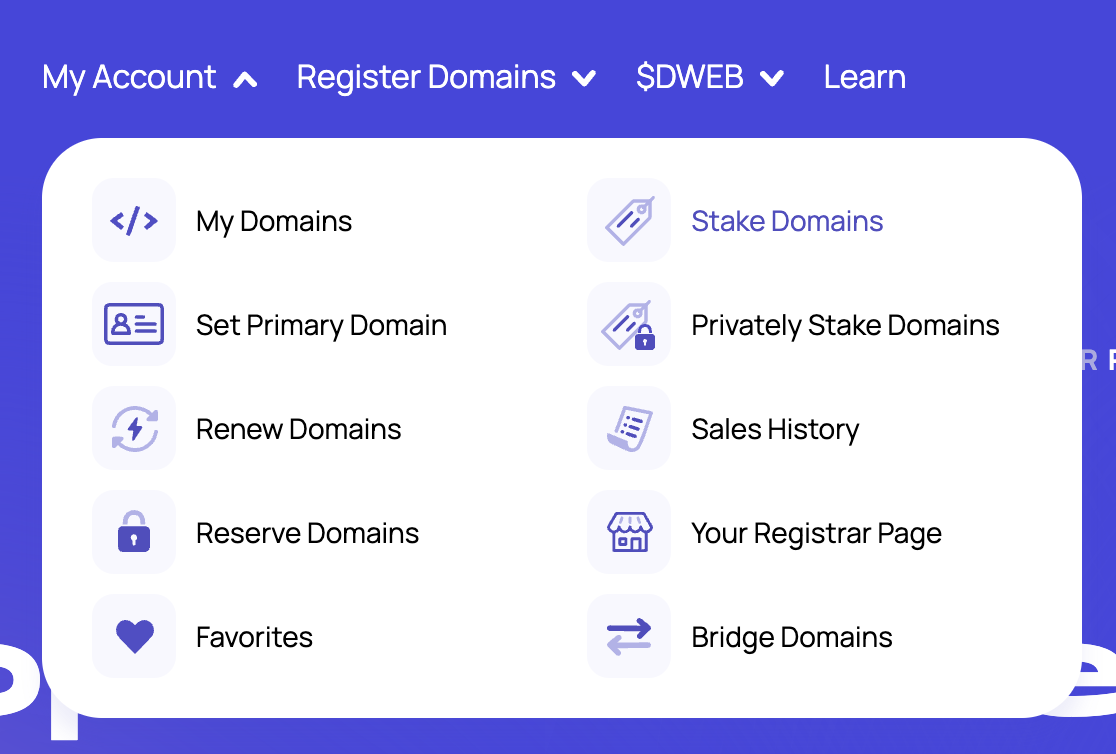
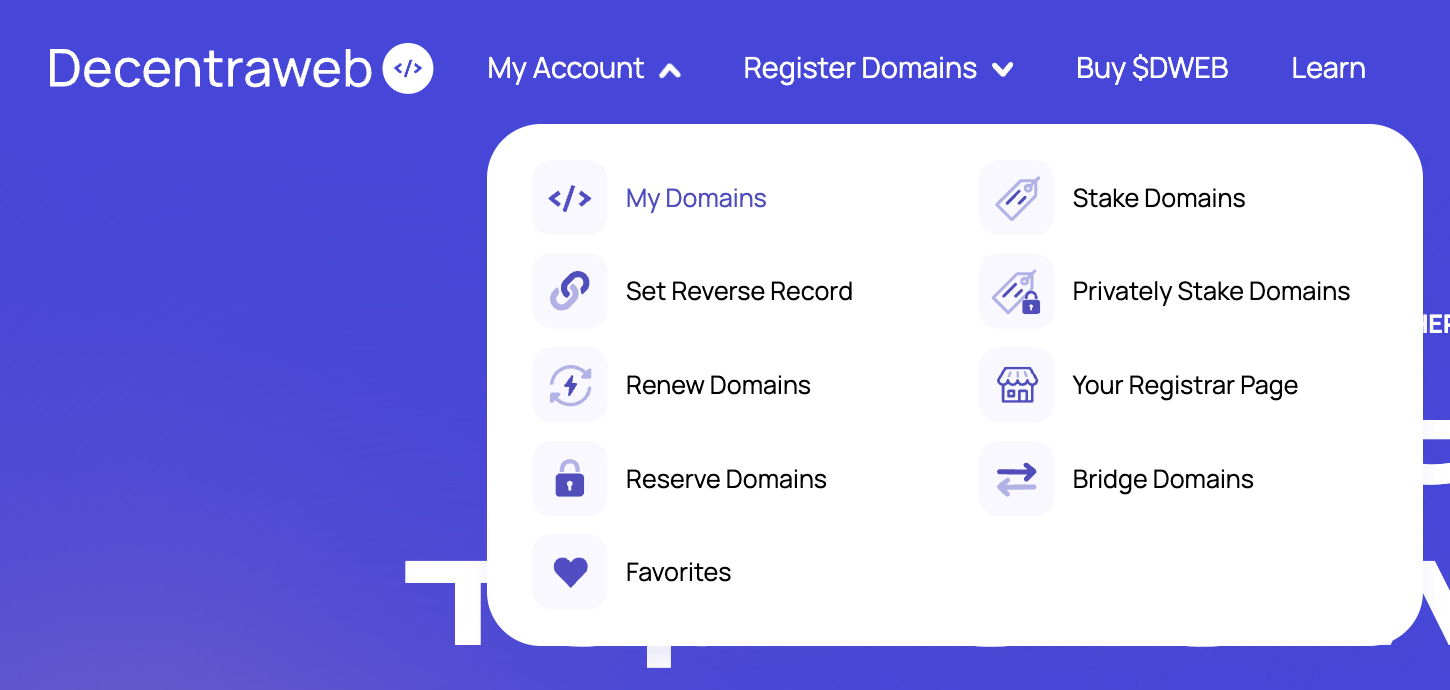
Within My Account navigation dropdown, select Set Primary Domain

Select the Domain you'd like to use for your Primary Domain and press Commit. This will open up 2 txns within your wallet to approve and pay gas.

<figure><img src="https://803738250-files.gitbook.io/~/files/v0/b/gitbook-x-prod.appspot.com/o/spaces%2FVtO5fXlAonsdE5E274CH%2Fuploads%2FZFHKh6zXhlrbm2Aw8H3a%2FScreenshot%202024-02-14%20at%204.57.08%20pm.png?alt=media&amp;token=bd6d2a80-eb68-48dd-b443-76940a435d44" alt=""><figcaption></figcaption></figure>

Following this transaction approving, refresh the page to see your Primary Domain has been set 🎉

<figure><img src="https://803738250-files.gitbook.io/~/files/v0/b/gitbook-x-prod.appspot.com/o/spaces%2FVtO5fXlAonsdE5E274CH%2Fuploads%2FpuIMdxOYtMvZjXBfKQJR%2FScreenshot%202024-02-14%20at%205.05.25%20pm.png?alt=media&amp;token=ff8c732c-f9db-4887-826f-1f726fa9f1af" alt=""><figcaption></figcaption></figure>

When setting your Primary Domain, you can also add Wallet Domains which points the domain set as your primary domain to wallet addresses for 150+ cryptocurrencies. Learn more about Wallet Domains below.

***

### Wallet Domains (Forward Records)

*Domain -> Wallet Address*

*.e.g 🍕 ->* 0xA19b...A3a192<br>

Wallet Domains allow for your Domain to point to your Wallet Address, thus allowing for payments to your Domain, which in turn is pointed to your wallet address.

You can set Wallet Domains for up to 150+ cryptocurrencies per Domain

You can have **unlimited Domains** with Wallet Domain records set to a singular wallet address. \
\
For example :&#x20;

*🍕 ->* 0xA19b...A3a192

*name.yourtld ->* 0xA19b...A3a192

*anything.yourtld ->* 0xA19b...A3a192

Wallet Domains are set per Domain. If you'd like to set Wallet Domains to your Primary Domain, you can do this when setting your Primary Domain Record.

#### How to set Wallet Domain Records

Connect your wallet that owns the domain(s) you'd like to set Wallet Domain records for within our  DNS App - [dns.decentraweb.org](https://dns.decentraweb.org)

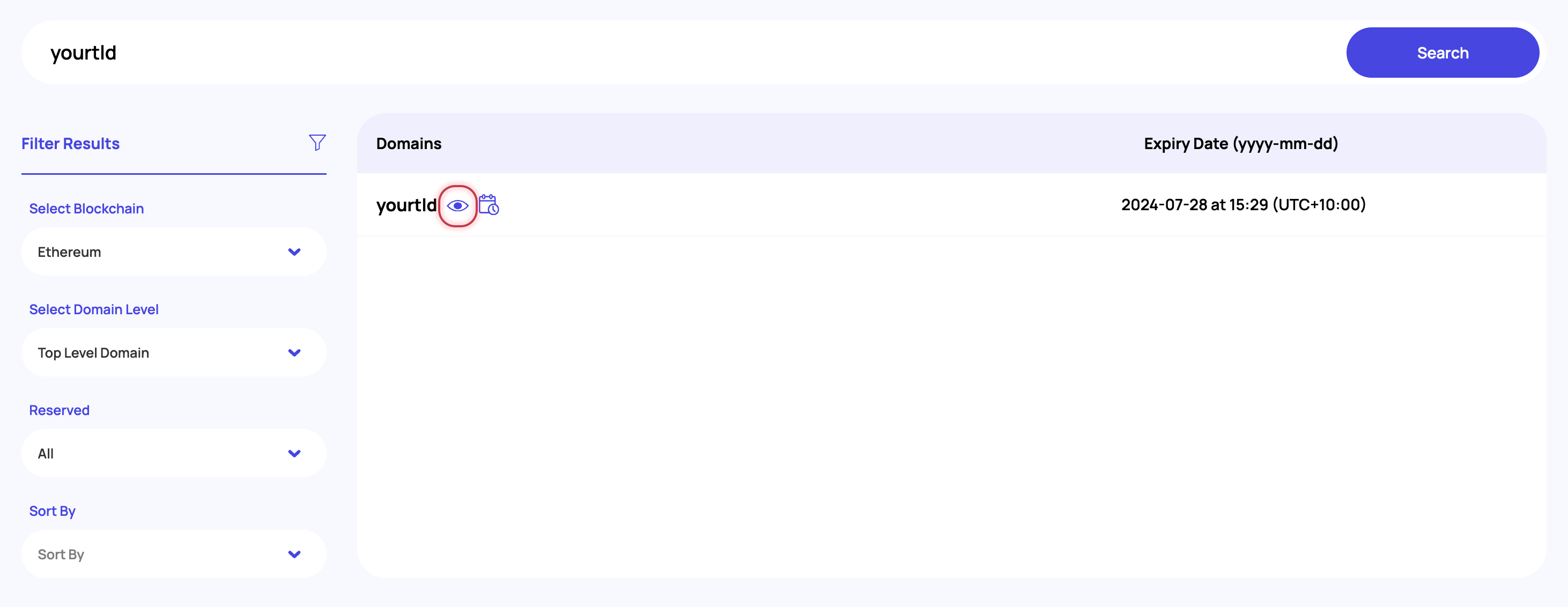
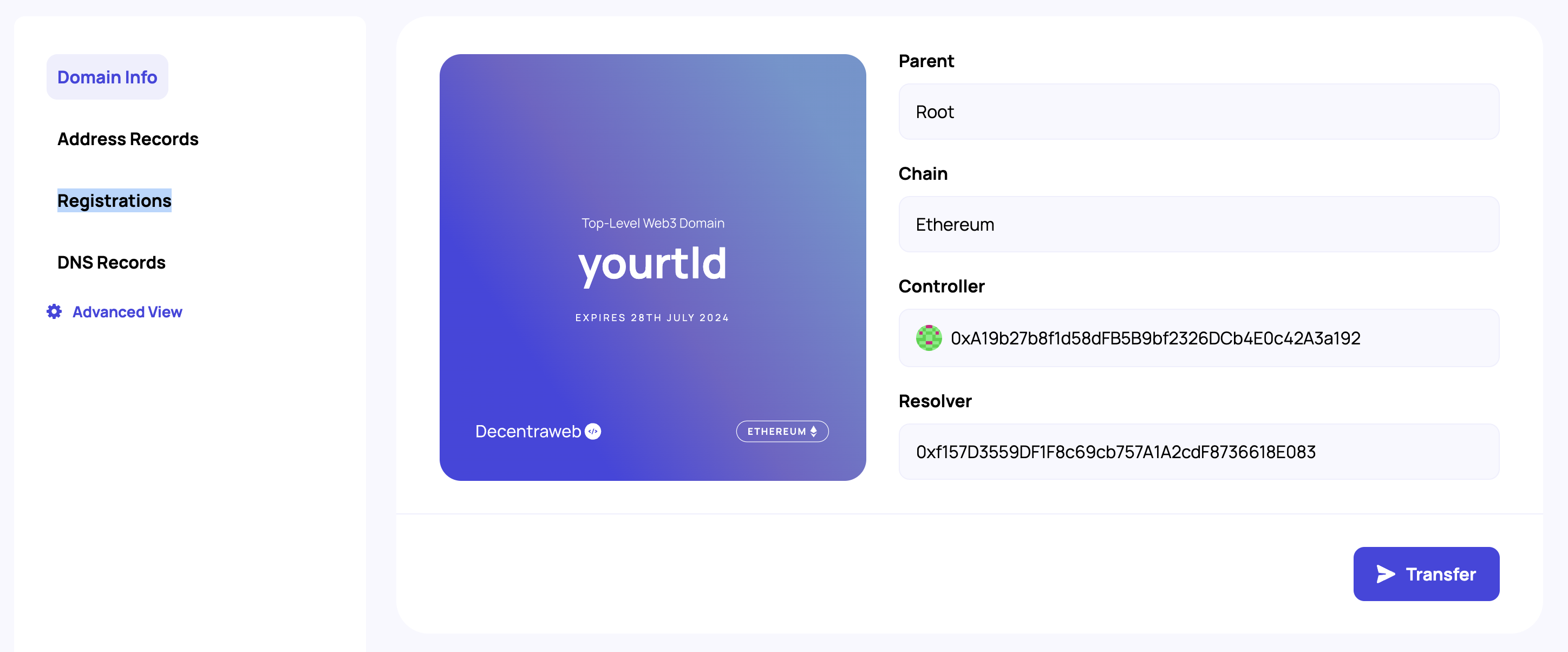
Within the My Account navigation, head to My Domains and select the Domain you'd like to set Wallet Domain Records for :&#x20;

<figure><img src="https://803738250-files.gitbook.io/~/files/v0/b/gitbook-x-prod.appspot.com/o/spaces%2FVtO5fXlAonsdE5E274CH%2Fuploads%2F2oOwISATtb9pWM3RjSXh%2Fimage.png?alt=media&amp;token=8890bf11-8b0e-4b6e-a7d7-f3a0b89b054e" alt=""><figcaption></figcaption></figure>

Within Address Records, select the blockchain/coin you'd like to set a Wallet Domain record for and paste in the wallet address you'd like your Decentraweb Domain to point to for that blockchain.

<figure><img src="https://803738250-files.gitbook.io/~/files/v0/b/gitbook-x-prod.appspot.com/o/spaces%2FVtO5fXlAonsdE5E274CH%2Fuploads%2Fgqs8Hb7lcYKO0iwJn1zn%2FScreenshot%202024-02-26%20at%205.33.23%20pm.png?alt=media&amp;token=5c6a6a8b-d959-4585-a9aa-cb906ef107cf" alt=""><figcaption></figcaption></figure>

\
\
**Decentraweb's SDK**\
\
Are you an app developer and interested in building further. Check out the full SDK and docs on our Github!\
\
<https://github.com/decentraweb/decentrawebjs>


# Resolving Decentralized Domains in your Browser

## Enable DWEB Resolver in your browser

The DWEB Resolver is accessed via [DNS-over-HTTPS](https://en.wikipedia.org/wiki/DNS_over_HTTPS) a feature that is supported by all major browsers and devices including iOS and Android phones. In our example we are using Chrome.

1. Open your Chrome Security settings : <chrome://settings/security>
2. Scroll down to "Advanced section" and under "Use Secure DNS" set Custom URL to **<https://resolver.decentraweb.org/dns-query>**

<figure><img src="https://803738250-files.gitbook.io/~/files/v0/b/gitbook-x-prod.appspot.com/o/spaces%2FVtO5fXlAonsdE5E274CH%2Fuploads%2FCjTR16nWKqpXKkU7rmJ1%2FScreenshot%202023-10-17%20at%204.57.39%20pm.png?alt=media&amp;token=ba93d740-13ec-40a7-8ac7-f79e7cdba5d6" alt=""><figcaption></figcaption></figure>

3. To verify your resolver is set visit: <http://hi.decentracheck/>
4. You should be able to see the text "Welcome to Web3! Your resolver is working."

If you don't see this message reach out to support in our [Discord](https://discord.gg/decentraweb)


# Setting DNS Records

{% hint style="info" %}
Replace all instances of [https://dns.decentraweb.org/](https://dns-rinkeby.decentraweb.org/) with <https://dns-goerli.decentraweb.org/> if you'd like to do the steps in Testnet!
{% endhint %}

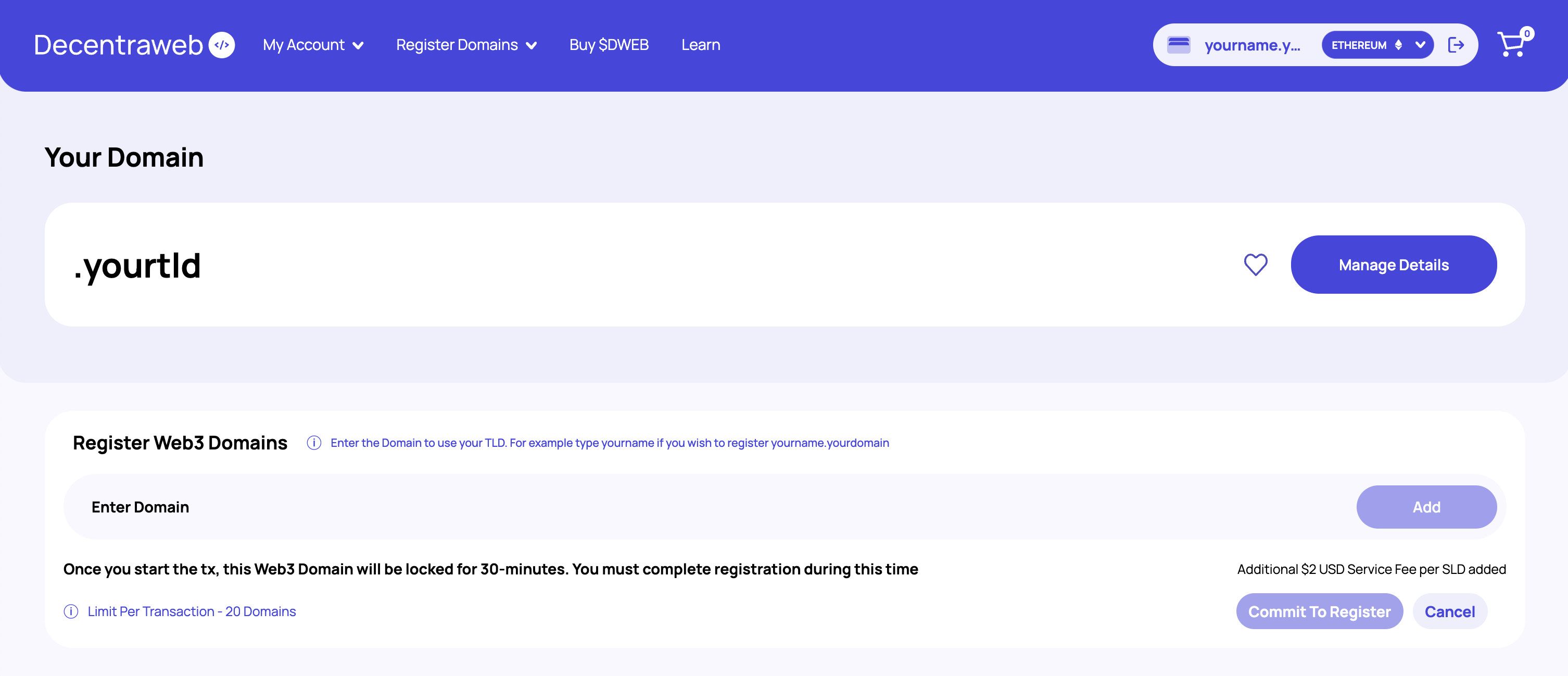
1. If you have just purchased a domain and are still on the checkout confirmation page, click "Manage Name" button and click the domain you just purchased. Otherwise just go to [https://dns.decentraweb.org/](https://dns-rinkeby.decentraweb.org/) > click "My Account" > click the domain you just purchased.
2. Decentraweb allows you to use your own Smart Contract Resolver. In most cases you should just use Decentraweb's default by clicking the "Use Decentraweb Resolver" button. This will trigger an on chain transaction.
3. Once this is complete you will see two new additions on the page for setting (IPFS) "Content" and "DNS records". Click the blue edit button on the DNS Records section.
4. From here you have a dropdown box with a few different DNS record types. Leave the default type on "A" record, set the "value" to the IP address of a webserver you have access to, leave TTL at "1 hour" which is how often the Decentraweb resolver will check for changes.
5. You can add as many DNS records as you like in one Ethereum transaction to save costs. Once you are complete click the blue "Commit" button to save it to the blockchain.
6. For Mac and Linux operating systems you can verify your DNS records were properly set on the blockchain via command-line. You can query against Decentraweb's DNS resolver directly. Wait about 30 seconds and run: `dig @15.197.159.209 -p 53 yourdomain`

![Example DWEB DNS query via command-line (Mac & Linux)](https://803738250-files.gitbook.io/~/files/v0/b/gitbook-x-prod.appspot.com/o/spaces%2FVtO5fXlAonsdE5E274CH%2Fuploads%2F1SGVMMzrz20F2Yog2tAb%2Fterminal%20-%20dig.png?alt=media\&token=99e47f88-af2f-4ccc-b72b-54b36b376a7c)

{% hint style="info" %}
Note: Modern browsers expect websites to be hosted on subdomains only. That is why you don't see websites at "com" or "net" or "gov", etc. Additionally Top Level Domains (TLD's) that browser don't recognize generally trigger a search. To get around this web3 domains usually have a forward slash "/". For example ENS domains use a forward slash such as [http://vitalik.eth/](http://sergiy.eth/). Decentraweb domains function similarly with the added bonus that if you do want to host a website directly on the highest TLD-level *you can* by referencing the domain as "🐳./" for example. Generally, however just using "[www.🐳/](http://www.🐳/)" is more user friendly than hosting direcly on a TLD.&#x20;
{% endhint %}


# dwebs.to Web2 Bridge

{% hint style="info" %}
Note that the DWEB bridge works with all DWEB TLD and SLDs (subdomains). Though the site may take 10-20 seconds to load the first time it's visited to generate the proper SSL certificate.
{% endhint %}

The ultimate goal of Decentraweb is to exist across all browsers, networks, VPN's, and web3 applications without the end user installing or configuring anything. In the meantime we have the DNS Resolver, the incoming Browser Plugin, and JavaScript SDK. The dwebs.to bridge is another way you can share your web3 content with web2 users.\
\
Any A, CNAME, or IPFS content records you set on your TLD's or subdomains should be accessible via dwebs.to in the following example:\
\
DWEB domains examples:\
\
<http://sagan./> (IPFS content record set)\
\
dwebs.to bridge example:\
\
<https://sagan.dwebs.to/>\
\
If you have pinned a folder to IPFS you can also link directly to assets like so:\
\
<https://sagan.dwebs.to/image/record.jpg>\
\ <br>


# Using IPFS

**IPFS** or the **InterPlanetary File System** is a protocol and peer-to-peer network for storing and sharing data in a distributed file system. It's an amazing technology that allows people to share content and "repin" the content to strengthen the bandwith for the file.&#x20;

An IPFS document is generally accessed by knowing it's **file hash** and then using an **IPFS gateway** to load the file. For example here is a link to an IPFS share featuring the music found on the [Voyager Golden Record](https://en.wikipedia.org/wiki/Voyager_Golden_Record). The file hash for this document is QmaFP38LkSFURqmGsv1TW6ncjuftRrZP8f78RR2Dd4hCGp. By knowing the file hash you can use any IPFS gateway to access this document. For example:\
\
<https://cloudflare-ipfs.com/ipfs/QmaFP38LkSFURqmGsv1TW6ncjuftRrZP8f78RR2Dd4hCGp/>

<https://ipfs.io/ipfs/QmaFP38LkSFURqmGsv1TW6ncjuftRrZP8f78RR2Dd4hCGp/>

DWEB domains have built-in support for linking directly to IPFS files via Decentraweb's IPFS gateway. A user who has the DWEB Resolver enabled can access the above IPFS file via a normal DWEB domain. \
\
Live examples:\
\
<http://golden.record/> (if you are connected to Goerli Test Resolver)\
<http://goldenrecord.sagan/> (if you are connected to Mainnet Resolver)

![Screenshot of http://golden.record/](https://803738250-files.gitbook.io/~/files/v0/b/gitbook-x-prod.appspot.com/o/spaces%2FVtO5fXlAonsdE5E274CH%2Fuploads%2FEbnsMdAwLqpFWMTxdV2f%2Fdecentraweb%20-%20golden%20record.png?alt=media\&token=be6d30b0-1277-41ef-9d99-739cf6f44b09)

{% hint style="info" %}
Replace all instances of [https://dns.decentraweb.org/](https://dns-rinkeby.decentraweb.org/) with <https://dns-goerli.decentraweb.org/> if you'd like to do the steps in Testnet!
{% endhint %}

## How to link a DWEB domain to an IPFS document

1. Before you start you should know the **IPFS Hash** of the document you want to link to. You can use a service like [https://pinata.cloud/](https://app.pinata.cloud/) to upload a file (up to 1GB free) and get an IPFS hash.&#x20;
2. Visit [https://dns.decentraweb.org/](<https://dns-rinkeby.decentraweb.org/ >), click "Manage Name" button and click the subdomain you want to link to IPFS.
3. Decentraweb allows you to use your own Smart Contract Resolver. In most cases you should just use Decentraweb's default by clicking the "Use Decentraweb Resolver" button. This will trigger an on chain transaction.
4. Once this is complete you will see two new additions on the page for setting (IPFS) "Content" and "DNS records". Click the blue edit button on the "Content" and past in a reference to your IPFS file. For example:\
   \
   ipfs\://bafybeifq6kpf3zybrk4dhhmeg7xc2kjlw2l4mhgfjkmmhaj4uszwf7hfse
5. Save your changes and within 1-minute CONGRATS you should be able to see your IPFS file via your DWEB subdomain. If it doesn't display, ensure you are running the DWEB Resolver.

<figure><img src="https://803738250-files.gitbook.io/~/files/v0/b/gitbook-x-prod.appspot.com/o/spaces%2FVtO5fXlAonsdE5E274CH%2Fuploads%2FohmDTUmxDT9r7ynlNHKP%2FScreenshot%202024-01-18%20at%205.22.55%20pm.png?alt=media&amp;token=e700056c-6541-46d4-9688-e54ca0fec3a9" alt=""><figcaption></figcaption></figure>


# Purchasing Domains


# Web3 Domains

Learn how to purchase Web3 Domains from community staked Top-Level Web3 Domains

With hundreds of staked community owned Top Level Web3 Domains, there's plenty of choice when it comes to finding your ideal Web3 Domain.

All Web3 Domain registrations occur a $2 USD service fee from Decentraweb. All other fees are decided upon by the owner of the respective Top-Level Web3 Domain owner.

***

To begin your search head to our DNS platform : [dns.decentraweb.org](https://dns.decentraweb.org) and select Web3 Domains from the Register Domains drop down.

Alternatively you can click this link : [dns.decentraweb.org/sld](https://dns.decentraweb.org/sld)

<figure><img src="https://803738250-files.gitbook.io/~/files/v0/b/gitbook-x-prod.appspot.com/o/spaces%2FVtO5fXlAonsdE5E274CH%2Fuploads%2FQQgZZmpIWD40uWp3BZBn%2FScreenshot%202024-01-20%20at%203.08.23%20pm.png?alt=media&amp;token=70710413-00bc-4021-b5c8-7391a197b5e1" alt=""><figcaption></figcaption></figure>

### Searching for Web3 Domains

Begin by searching for the name you'd like to use within your Web3 Domain. In this example we'll be searching for Web3 Domains that use "anything"

<figure><img src="https://803738250-files.gitbook.io/~/files/v0/b/gitbook-x-prod.appspot.com/o/spaces%2FVtO5fXlAonsdE5E274CH%2Fuploads%2FTfXnaonPx5OHUgptnEkN%2FScreenshot%202024-01-22%20at%203.17.09%20pm.png?alt=media&amp;token=5f618590-35eb-4f98-b283-116671e6837b" alt=""><figcaption></figcaption></figure>

By searching for the name we'd like to use within our Web3 Domain we can view the available Top-Level Web3 Domains we can register our name against.

Prices are listed in $ USD and you can easily view registration fees and if there are renewal fees, how much these are per year.

<figure><img src="https://803738250-files.gitbook.io/~/files/v0/b/gitbook-x-prod.appspot.com/o/spaces%2FVtO5fXlAonsdE5E274CH%2Fuploads%2F0Mjqx6xd589FhBnA2nu0%2FScreenshot%202024-01-22%20at%203.20.16%20pm.png?alt=media&amp;token=e65e99bf-7008-444e-ad4a-539b5d035100" alt=""><figcaption></figcaption></figure>

You can easily filter your search results by selecting Filter Results. Here you can select which blockchain to register your Web3 Domain on, sort by popularity and price, select which character set the Top-Level Web3 Domain uses and also filter by length of Top-Level Web3 Domain.

In addition, you can also utilize the Search Top-Level Domains, if you have a Web3 TLD in mind that you'd like to register your Web3 Domain against.

<figure><img src="https://803738250-files.gitbook.io/~/files/v0/b/gitbook-x-prod.appspot.com/o/spaces%2FVtO5fXlAonsdE5E274CH%2Fuploads%2F90VgkVrDxSPVBRFB6QA3%2FScreenshot%202024-01-22%20at%203.25.00%20pm.png?alt=media&amp;token=f7c27c44-e24e-40b1-bd0c-a9b94c2bdc97" alt=""><figcaption></figcaption></figure>

Select which Web3 Domains you'd like to register. You can add as many as you like to your registration.

<figure><img src="https://803738250-files.gitbook.io/~/files/v0/b/gitbook-x-prod.appspot.com/o/spaces%2FVtO5fXlAonsdE5E274CH%2Fuploads%2FATSlDO7t8BCXCW17vp1P%2FScreenshot%202024-01-22%20at%203.32.54%20pm.png?alt=media&amp;token=4ca94462-897d-46c8-8b51-f440ae08b0f2" alt=""><figcaption></figcaption></figure>

### Web3 Domain Pricing

In this example, we can see that we've added two Web3 Domains to our cart. The pricing and terms of registration are defined and as we can see within this example :&#x20;

anything.bored - Registration fee $8 USD with yearly renewal fee of $8 USD

*For renewable Web3 Domains, we can register for up to 5 years within the registration process. Alternatively you can renew yearly before the Web3 Domain expires.*<br>

anything.epic - Registration fee $9 USD with no yearly renewal fee as the Web3 Domain has no expiry

*For Web3 Domains with no expiry, these are permanent but can be transferred to other wallets or sold*

&#x20;

When registering a Web3 Domain from a community owned Web3 Top-Level Domain, the prices are terms have been defined by the Web3 TLD owner. At time of registration, you agree to the terms and prices set. These terms and prices cannot be changed by the Web3 TLD owner and if the Web3 TLD expires, your Web3 Domain will still exist.

If the Web3 TLD owner increases or decreases the pricing or switches from no expiry to renewable or from renewable to no expiry, these changes won't effect your registration, as the pricing and terms defined at registration are fixed for your registration.

In addition to the pricing set by the Web3 TLD owner, there is an additional service fee added by Decentraweb :&#x20;

**Web3 Domain Registrations :** $2 USD per Web3 Domain

**Web3 Domain Renewals :** $5 USD per Web3 Domain

<figure><img src="https://803738250-files.gitbook.io/~/files/v0/b/gitbook-x-prod.appspot.com/o/spaces%2FVtO5fXlAonsdE5E274CH%2Fuploads%2F30hkJXnpnAJkK18MnKfh%2FScreenshot%202024-01-22%20at%203.34.01%20pm.png?alt=media&amp;token=696a41f6-a33b-4e13-9fc2-4d67aec8d24f" alt=""><figcaption></figcaption></figure>

### Purchasing Web3 Domains

When purchasing Web3 Domains on Ethereum Network, you can pay for your Web3 Domains using $DWEB or Ethereum (ETH).

When purchasing Web3 Domains on Polygon Network, you can pay for your Web3 Domains using $DWEB or Wrapped Ethereum (WETH).

When you're ready to process your purchase, simply select which currency you'd like to pay with.

This will open up a transaction within your wallet for the total price plus network gas fees.

Upon approving and completing the transaction, you'll now be the proud owner of your Web3 Domains 🎉


# Top-Level Web3 Domains

Learn how to purchase a Top-Level Web3 Domain with Decentraweb

When purchasing and registering a Top-Level Web3 Domain, you'll first need to check the availability of your chosen Web3 TLD.

Begin your registration by searching for your ideal Web3 TLD at [dns.decentraweb.org](https://dns.decentraweb.org)

<figure><img src="https://803738250-files.gitbook.io/~/files/v0/b/gitbook-x-prod.appspot.com/o/spaces%2FVtO5fXlAonsdE5E274CH%2Fuploads%2FFUA9C4BsK6zYr5DlSgid%2FScreenshot%202024-01-18%20at%205.29.58%20pm.png?alt=media&amp;token=8504492b-4719-485c-b5f3-768e1cacdee6" alt=""><figcaption></figcaption></figure>

Ensure that your wallet is connected to our platform to begin making your registration and purchase

If the Web3 TLD is available, you'll be able to proceed by adding the Web3 TLD to your cart.

Here you can select which Network to register your Web3 TLD on.

<figure><img src="https://803738250-files.gitbook.io/~/files/v0/b/gitbook-x-prod.appspot.com/o/spaces%2FVtO5fXlAonsdE5E274CH%2Fuploads%2FlaZpagF05xbKOANZlPX3%2FScreenshot%202024-01-18%20at%205.43.22%20pm.png?alt=media&amp;token=ad382fd3-27b2-46e8-b5ba-c47e3281f75b" alt=""><figcaption></figcaption></figure>

***

### Selecting Chain for Registration

You can register Web3 TLDs on either Ethereum or Polygon.<br>

**Ethereum Registrations**

You can pay with Ethereum or $DWEB (on Ethereum) for 50% Off\
Ethereum Web3 TLDs can create Ethereum Web3 Domains using your Web3 TLD<br>

**Polygon Registrations**

You can pay with Wrapped Ethereum (WETH) or $DWEB (on Polygon) for 50% Off\
Polygon Web3 TLDs can create Polygon Web3 Domains using your Web3 TLD.\
\
Note : All Decentraweb Domain levels can be bridged Ethereum <- -> Polygon at any point. [Learn more](/decentraweb/learn/using-decentraweb-domains/using-domains-bridge)<br>

**Want to Purchase $DWEB?** [Learn more​](/decentraweb/dweb/about-dweb-token)<br>

***

### Checkout Process <a href="#checkout-process" id="checkout-process"></a>

Once you've selected your Chain for Registration, you'll be able to select your payment method.&#x20;

<figure><img src="https://803738250-files.gitbook.io/~/files/v0/b/gitbook-x-prod.appspot.com/o/spaces%2FVtO5fXlAonsdE5E274CH%2Fuploads%2FyYHCKa8QKKL3WaoNll2e%2FScreenshot%202024-01-18%20at%205.44.40%20pm.png?alt=media&amp;token=4c113a6d-282a-4378-8188-2a8675b03a2e" alt=""><figcaption></figcaption></figure>

Registering a Web3 TLD requires completion of a simple three step process. Within each step it's important to not cancel the transaction or modify the gas total.​<br>

### 1. Request To Register

Select the request to register button to approve the first of two transactions to secure your domains. This will require confirmation on the blockchain and will cost blockchain gas fees.

<figure><img src="https://803738250-files.gitbook.io/~/files/v0/b/gitbook-x-prod.appspot.com/o/spaces%2FVtO5fXlAonsdE5E274CH%2Fuploads%2FJkIqYfZS21AXQozkgTzd%2Frequesttoregister1.jpg?alt=media&amp;token=db924072-26da-4478-b315-6b3c913d04f6" alt=""><figcaption></figcaption></figure>

Once you've selected Request to Register you'll see the following message within your checkout whilst the transaction is being completed on-chain.

<figure><img src="https://803738250-files.gitbook.io/~/files/v0/b/gitbook-x-prod.appspot.com/o/spaces%2FVtO5fXlAonsdE5E274CH%2Fuploads%2FMVW8kdJpIEa9RpRXxE2f%2Frequesttoregister2.jpg?alt=media&amp;token=9dc7c3bc-d6c6-4dcf-b4a9-73237a3d8135" alt=""><figcaption></figcaption></figure>

### 2. Waiting Period

<figure><img src="https://803738250-files.gitbook.io/~/files/v0/b/gitbook-x-prod.appspot.com/o/spaces%2FVtO5fXlAonsdE5E274CH%2Fuploads%2FGCG4wbWmPj0dzoehWzkn%2Frequesttoregister3.jpg?alt=media&amp;token=6211a4ee-fc5f-415c-888a-b816015cf0f9" alt=""><figcaption></figcaption></figure>

Once the previous request the register transaction has been processed you need to wait for 60 seconds. This waiting period is to ensure that another person hasn't tried to register the same Web3 TLD at the same time as you.

### 3. Submit Payment

<figure><img src="https://803738250-files.gitbook.io/~/files/v0/b/gitbook-x-prod.appspot.com/o/spaces%2FVtO5fXlAonsdE5E274CH%2Fuploads%2FSx7pXhJcYKFMkrjUfJ6l%2Frequesttoregister4.jpg?alt=media&amp;token=56dc290e-2f53-458e-aaf7-9cb882bc4f33" alt=""><figcaption></figcaption></figure>

Once the waiting period has ended you'll be able to select Pay Now to pay your Web3 TLD registration fees.

Please note that this fee will also require the blockchain's gas fee.

Upon completion of the transaction and payment you'll now be the proud owner of your Web3 TLD! 🎉


# Web3 TLD Guides


# Custom Art for Domains

Learn how to apply custom art for Web3 Domains registered against your Top-Level Web3 Domain

Applying custom artwork assigns your custom colors and logo to all Web3 Domains registered from your Web3 TLD.

For example, if you assigned custom art to your Web3 TLD .yourname, then all new and existing Web3 Domains registered against .yourname such as hi.yourname will use your custom branded artwork.

{% hint style="info" %}
You can change artwork for Web3 Domains registered from your Web3 TLD whenever you like. Once updated be sure you refresh the metadata of the Web3 Domain within any NFT Marketplace to see your new artwork live
{% endhint %}

**You can assign your custom, branded art when staking or privately staking your Web3 TLD.**\ <br>

***

### How to Apply for Staked Web3 TLDs

Within our DNS Platform (dns.decentraweb.org) connect the wallet which owns the Web3 TLD you'd like to create custom artwork for, then head to Stake Domains.

In this example we are staking our Web3 TLD for the first time. For already staked Web3 TLDs, you'll need to select the Web3 TLD and press Edit.

When staking your Web3 TLD, you'll need to assign your Registration Fee, Opt for Renewable or No-Expiry for your Web3 Domain Registrations, if opting for Renewable you'll need to provide your Yearly Renewal Fee, then finally we can opt for either Standard or Custom Art.&#x20;

<figure><img src="https://803738250-files.gitbook.io/~/files/v0/b/gitbook-x-prod.appspot.com/o/spaces%2FVtO5fXlAonsdE5E274CH%2Fuploads%2F6nCf81LrkYYj7OvhDQ8O%2FScreenshot%202024-02-21%20at%205.15.20%20pm.png?alt=media&amp;token=3c848393-f1c2-4d20-abec-07f601a697ef" alt=""><figcaption></figcaption></figure>

We'll go ahead and select Custom for our Domain Art.

Here we can now upload our Square Logo, assign text color for all text within our Domain Art and set a background color. You'll see a set up like below to start with.

<figure><img src="https://803738250-files.gitbook.io/~/files/v0/b/gitbook-x-prod.appspot.com/o/spaces%2FVtO5fXlAonsdE5E274CH%2Fuploads%2Fiz2LmrWgxTaiYLKudEXV%2FScreenshot%202024-02-21%20at%205.19.38%20pm.png?alt=media&amp;token=a5d840f9-c223-4000-a3c6-c2ef704d67e4" alt=""><figcaption></figcaption></figure>

####

#### Solid Background Example

In this example, we've added our logo which is 200px by 200px, opted for Black Text and a Solid Background Color using an orange color with the hex code #ff800c

Once you're happy with your set up, press Stake which will open a signature to sign within your wallet. Signing this will allow others to register Web3 Domains from your Web3 TLD at the fees and terms you set, with your new snazzy domain art applied 🎉

<figure><img src="https://803738250-files.gitbook.io/~/files/v0/b/gitbook-x-prod.appspot.com/o/spaces%2FVtO5fXlAonsdE5E274CH%2Fuploads%2FyfSMPRMDwvCntuMEeWUC%2FScreenshot%202024-02-28%20at%209.45.56%20am.png?alt=media&amp;token=246e81db-559e-49fa-8451-f7828b69839d" alt=""><figcaption></figcaption></figure>

#### Gradient Background Example

In this example, we've added our logo which is 200px by 200px, opted for White Text and applied our gradient at an angle of 45' with #cb16ff as our first color and #4646E0 as our second color.

Once you're happy with your set up, press Stake which will open a signature to sign within your wallet. Signing this will allow others to register Web3 Domains from your Web3 TLD at the fees and terms you set, with your new snazzy domain art applied 🎉

<figure><img src="https://803738250-files.gitbook.io/~/files/v0/b/gitbook-x-prod.appspot.com/o/spaces%2FVtO5fXlAonsdE5E274CH%2Fuploads%2FYmcB1WsbWjl5inPPjUhX%2FScreenshot%202024-02-28%20at%209.44.18%20am.png?alt=media&amp;token=41c56958-46c6-4fc3-a0f0-eb2018f8e02e" alt=""><figcaption></figcaption></figure>

***

### How to Apply for Privately Staked Web3 TLDs

Applying custom artwork for Privately Staked Web3 TLDs follows the same set up as above but is done at the same time as setting up your Allowlist functionality through pasting in wallet addresses or allowing access based on ownership of any ERC20 or ERC721 token on Ethereum or Polygon Networks

<figure><img src="https://803738250-files.gitbook.io/~/files/v0/b/gitbook-x-prod.appspot.com/o/spaces%2FVtO5fXlAonsdE5E274CH%2Fuploads%2FOi80eFgMoDD3MIeefrqK%2FScreenshot%202024-02-21%20at%205.45.11%20pm.png?alt=media&amp;token=5b33eacd-6db7-4f2b-bbf8-a673e6886dfa" alt=""><figcaption></figcaption></figure>

There we have it! It's super easy to assign custom, branded artwork to your domains for that extra level of customization and professionalism for your community.

Owners of domains registered from your Web3 TLD, will be able to see their custom, branded art when viewing their domain within our DNS platform or within any NFT Marketplace.

<figure><img src="https://803738250-files.gitbook.io/~/files/v0/b/gitbook-x-prod.appspot.com/o/spaces%2FVtO5fXlAonsdE5E274CH%2Fuploads%2FamhTiQsMSU4jA2jhbk71%2FScreenshot%202024-02-26%20at%209.39.51%20pm.png?alt=media&amp;token=8c2dbe80-4927-49c0-acc4-1d033972b144" alt=""><figcaption></figcaption></figure>


# Renewing Web3 TLDs

Learn how to renew Decentraweb Domains

Renewing Web3 TLDs can be done within the DNS Platform : [dns.decentraweb.org](https://dns.decentraweb.org/)

Connect your wallet and then select Renew Domains within the Navigation

<figure><img src="https://803738250-files.gitbook.io/~/files/v0/b/gitbook-x-prod.appspot.com/o/spaces%2FVtO5fXlAonsdE5E274CH%2Fuploads%2FuNEZEpvXvf3BTrVOx6Yu%2FScreenshot%202024-01-19%20at%2010.40.13%20am.png?alt=media&amp;token=884ffcb6-0158-486e-81f0-15f9d123171c" alt=""><figcaption></figcaption></figure>

### Step One

Select which domains you'd like to renew

<figure><img src="https://803738250-files.gitbook.io/~/files/v0/b/gitbook-x-prod.appspot.com/o/spaces%2FVtO5fXlAonsdE5E274CH%2Fuploads%2FUim2xeSZdR6DoHzmSufv%2FScreenshot%202024-01-19%20at%2010.42.05%20am.png?alt=media&amp;token=44295478-940b-44dc-ba71-76c83983b4ee" alt=""><figcaption></figcaption></figure>

### Step Two

Once you've selected which domains to renew, you'll be taken to our checkout where you can select to pay with $DWEB or ETH

{% hint style="info" %}
Use $DWEB Token to save 50% Off Web3 TLD Renewals
{% endhint %}

<figure><img src="https://803738250-files.gitbook.io/~/files/v0/b/gitbook-x-prod.appspot.com/o/spaces%2FVtO5fXlAonsdE5E274CH%2Fuploads%2FW07SF7vBXB25MlS388uC%2Fimage.png?alt=media&amp;token=34d7885e-2089-48bf-b082-7e97adbe3c19" alt=""><figcaption></figcaption></figure>

When paying with $DWEB, you may be prompted to approve spending of your $DWEB. Select Approve then approve within your wallet

<figure><img src="https://803738250-files.gitbook.io/~/files/v0/b/gitbook-x-prod.appspot.com/o/spaces%2FVtO5fXlAonsdE5E274CH%2Fuploads%2FOFKwQbHlcEZw0USkhQwi%2Ftldrenewal.jpg?alt=media&amp;token=e71fecac-7d31-402d-9205-a25d41f17298" alt=""><figcaption></figcaption></figure>

Follow the steps within the checkout to easily renew your Domains!


# Staking Web3 TLDs

How to stake your Top-Level Web3 Domain and sell Web3 Domain Registrations

By Staking your Web3 TLD, you open it up to allow others to register Web3 Domains using your Web3 TLD at prices and terms you set.

For example, say you own .yourtld and stake it for $100 per registration with a $10 yearly renewal fee. This means someone else could go ahead and register theirname.yourtld as their Web3 Domain. Paying $100 for their registration and then $10 yearly renewal fee.

Web3 TLDs registered on both Ethereum and Polygon Networks can be staked.

Web3 TLDs can provide both expiry-less and renewable Web3 Domains

***

### How to Stake Web3 TLD

Head to the DNS Platform : dns.decentraweb.org and click Stake Domains

<figure><img src="https://803738250-files.gitbook.io/~/files/v0/b/gitbook-x-prod.appspot.com/o/spaces%2FVtO5fXlAonsdE5E274CH%2Fuploads%2FInwBtJHehuRyPad6ifx7%2FScreenshot%202024-03-01%20at%201.32.33%20pm.png?alt=media&amp;token=f06e72e8-20c0-4021-a52a-b0ea97d12c26" alt=""><figcaption></figcaption></figure>

Select which domains you'd like to stake. You can select as many as you like, but in this example we'll be staking a single Web3 TLD.&#x20;

Once selected press Stake

<figure><img src="https://803738250-files.gitbook.io/~/files/v0/b/gitbook-x-prod.appspot.com/o/spaces%2FVtO5fXlAonsdE5E274CH%2Fuploads%2FqHQHfzXuluWocCXPCulZ%2FScreenshot%202024-01-19%20at%2011.24.28%20am.png?alt=media&amp;token=f2170bd1-f969-4f5d-b8b3-cba9750db518" alt=""><figcaption></figcaption></figure>

***

### Setting Registration Parameters

Next we need to define our pricing and terms for registrations using the Web3 TLD.

**Registration Fee :** Set the $USD Price per Web3 Domain Registration from your Web3 TLD

**Renewable/No Expiry :** Select whether to provide Web3 Domains that need to be renewed yearly or Web3 Domains that have No Expiry Date

**Renewal Fee :** Set the Yearly Renewal Fee Price in $USD

**Domain Art :** Opt for Standard or Custom Art for all Domains registered from your TLD. [Click here to read our guide on Custom Art](/decentraweb/learn/web3-tld-guides/custom-art-for-domains)<br>

*Note : 70% of all Registration and Renewal Fees will be sent to the wallet which owns and has staked the Web3 TLD, in DWEB Tokens or ETH at the current market value of DWEB/ETH vs $USD. The remaining 30% of each Web3 Domain sale is evenly split between Decentraweb Development Fund and the $DWEB Staking Rewards Pool.*

{% hint style="info" %}
In addition to your set registration and renewal fees, Decentraweb charges the registrant a $2 USD Service Fee per Web3 Domain Registration and $5 USD Service Fee per Web3 Domain Renewal
{% endhint %}

<figure><img src="https://803738250-files.gitbook.io/~/files/v0/b/gitbook-x-prod.appspot.com/o/spaces%2FVtO5fXlAonsdE5E274CH%2Fuploads%2FbARIeQqrFIVJ1SrrXOp8%2FScreenshot%202024-03-01%20at%201.33.25%20pm.png?alt=media&amp;token=9fdebd0f-8655-473d-b61e-7200a59c5993" alt=""><figcaption></figcaption></figure>

***

Once you've defined your pricing and terms, select Stake to proceed. This will open up a signature request within your wallet to approve the staking of your Web3 TLD.

<figure><img src="https://803738250-files.gitbook.io/~/files/v0/b/gitbook-x-prod.appspot.com/o/spaces%2FVtO5fXlAonsdE5E274CH%2Fuploads%2FQsLitvLIExWeuEWIBQ8f%2FScreenshot%202024-01-19%20at%2011.57.01%20am.png?alt=media&amp;token=0bca4548-a3be-4aeb-8f70-e2437199bacb" alt=""><figcaption></figcaption></figure>

There we have it! Web3 TLD has been staked and anyone else can now register a Web3 Domain from this Web3 TLD 🎉✨

***

### How to Edit Prices, Edit Art or Un-Stake

At any point you can opt to edit your prices or un-stake your Web3 TLD.

When doing either of these, you won't effect the Web3 Domains that have already been registered/purchased from your Web3 TLD. The terms which were in place at the time of registration are the agreement between you and the registrant. \
\
You may opt to switch to provide renewable Web3 Domains, but if someone has purchased from you whilst the Web3 TLD was staked to provide Web3 Domain with no expiry then this agreement will stay in place for those already registered.\
\
The same applies for when you may decide to update your renewal pricing. If a user has registered their Web3 Domain from your Web3 TLD whilst your renewal fee for $10 for example, and you then increase or decrease this amount, the registrant will continue to pay $10 renewal fees, as this was the agreement at time of registration.

Select the Web3 TLD you'd like to edit prices for or un-stake.\
You'll then see the options highlighted below. \
\
Select Un-Stake to Un-Stake.\
\
Select Edit to Edit Pricing or Art.

<figure><img src="https://803738250-files.gitbook.io/~/files/v0/b/gitbook-x-prod.appspot.com/o/spaces%2FVtO5fXlAonsdE5E274CH%2Fuploads%2FBGHDAq2bTa6hKduS6LZ8%2Ftldstaking1.jpg?alt=media&amp;token=5f419562-21ed-4d77-a9b5-be0686a72283" alt=""><figcaption></figcaption></figure>

***

### Next Steps

**Customize your Registration Page**

Apply your brand colors and upload your logo to your registration page to share with your community

{% embed url="<https://docs.decentraweb.org/decentraweb/learn/dns-platform-guides/customizing-web3-domain-registration-page>" %}

**Implement our SDK into your platform**

Want to allow your users to register and manage Web3 Domains using your Web3 TLD within your website, app or platform? Integrate our Core SDK for full integration of our technology.&#x20;

{% embed url="<https://docs.decentraweb.org/decentraweb/for-developers/our-sdk/core-full-integration>" %}


# Private Staking Web3 TLDs - Allowlist

Learn how to Privately Stake your Web3 TLD to allow exclusive access to register a Web3 Domain from your Web3 TLD

Private staking is perfect for users, projects and companies who want to allow their community exclusive access to register Web3 Domains from their Web3 TLD through Allowlist technology.

By privately staking your Web3 TLD, you can allow access to wallet addresses based on holding of any ERC20 Token, ERC721 (NFT) Token or by manually pasting in your list of allowlisted wallet addresses.&#x20;

***

### How to Privately Stake your Web3 TLD

First, head to our DNS Platform : [dns.decentraweb.org](https://dns.decentraweb.org/)

Connect the wallet which owns your Web3 TLD you'd like to privately stake. If you need to purchase your Web3 TLD you can follow our guide on purchasing Web3 TLDs : [Purchasing Web3 TLD](/decentraweb/learn/purchasing-domains/top-level-web3-domains)

Select Privately Stake Domains within the DNS Navigation

<figure><img src="https://803738250-files.gitbook.io/~/files/v0/b/gitbook-x-prod.appspot.com/o/spaces%2FVtO5fXlAonsdE5E274CH%2Fuploads%2FfenRP6s3I0OTaA86MlTB%2FScreenshot%202024-03-01%20at%201.01.18%20pm.png?alt=media&amp;token=4d7d19e2-0f34-4bf2-a63f-c28578c99ea5" alt=""><figcaption></figcaption></figure>

Select the Top-Level Web3 Domain you'd like to Privately Stake and select Set Up Allowlist Access

<figure><img src="https://803738250-files.gitbook.io/~/files/v0/b/gitbook-x-prod.appspot.com/o/spaces%2FVtO5fXlAonsdE5E274CH%2Fuploads%2Fd87kbc6Ol8P84XAv6l4z%2FScreenshot%202024-01-19%20at%2012.22.57%20pm.png?alt=media&amp;token=f4c0624b-b91d-4ebe-95c3-a38ac83573e0" alt=""><figcaption></figcaption></figure>

### Setting Registration Parameters

First we need to assign the following parameters for users registering Web3 Domains from your Privately Staked TLD

#### **Parameters**

***

**Registration Fee :** $USD fee per Web3 Domain Registration from your Web3 TLD

**Max Per Wallet :** Maximum number of Web3 Domains a user can register from your Web3 TLD

**Renewable or No Expiry :** Provide Web3 Domains that require renewal or are expiryless

**Renewal Fee :** If Renewable is set, how much to charge per year as a renewal fee?

**Domain Art :** Select from Standard or Custom for branded Web3 Domain art.

{% hint style="info" %}
Learn more about Custom Domain Art [here](/decentraweb/learn/web3-tld-guides/custom-art-for-domains)
{% endhint %}

<figure><img src="https://803738250-files.gitbook.io/~/files/v0/b/gitbook-x-prod.appspot.com/o/spaces%2FVtO5fXlAonsdE5E274CH%2Fuploads%2FEfQZYJyUzCCKJutPnVDe%2FScreenshot%202024-03-01%20at%201.03.07%20pm.png?alt=media&amp;token=067e8670-2006-41c5-8f8e-6cc15a3e156e" alt=""><figcaption></figcaption></figure>

*Note : 70% of all Registration and Renewal Fees will be sent to the wallet which owns and has staked the Web3 TLD, in DWEB Tokens or ETH at the current market value of DWEB/ETH vs $USD. The remaining 30% of each Web3 Domain sale is evenly split between Decentraweb Development Fund and the $DWEB Staking Rewards Pool.*

{% hint style="info" %}
In addition to your set registration and renewal fees, Decentraweb charges the registrant a $2 USD Service Fee per Web3 Domain Registration and $5 USD Service Fee per Web3 Domain Renewal
{% endhint %}

***

### Establishing Allowlist

When setting up your Allowlist you are able to choose from three options :&#x20;

1. Paste Wallet Addresses
2. Allow to holders of ERC721 or ERC721A Token (NFTs)
3. Allow to holders of ERC20 Token

<figure><img src="https://803738250-files.gitbook.io/~/files/v0/b/gitbook-x-prod.appspot.com/o/spaces%2FVtO5fXlAonsdE5E274CH%2Fuploads%2FrM34yInvtxZTxyTtQ7XU%2FScreenshot%202024-03-01%20at%201.11.18%20pm.png?alt=media&amp;token=7bfef1d3-4298-4205-97d8-fadc446f2713" alt=""><figcaption></figcaption></figure>

***

**Paste Wallet Addresses**

A solution for smaller communities or for teams

Paste your list of nominated wallet addresses ensuring that each Wallet Address is on a new line

Press Activate Allowlist and approve signature within your wallet

<figure><img src="https://803738250-files.gitbook.io/~/files/v0/b/gitbook-x-prod.appspot.com/o/spaces%2FVtO5fXlAonsdE5E274CH%2Fuploads%2FnBuwBdNSiRphMv7oKxi0%2FScreenshot%202024-01-19%20at%2012.37.00%20pm.png?alt=media&amp;token=ab13d52b-4009-49f8-8790-93d60f481fc3" alt=""><figcaption></figcaption></figure>

***

**ERC20 Token**

A solution for communities based on holding of an ERC20 Token

We currently support Ethereum and Polygon Contract Addresses

Simply enter the Mainnet Contract Address of an ERC20 Token a wallet address must hold to be granted access to register a Web3 Domain from your Privately Staked Web3 TLD

Press Activate Allowlist and approve signature within your wallet

<figure><img src="https://803738250-files.gitbook.io/~/files/v0/b/gitbook-x-prod.appspot.com/o/spaces%2FVtO5fXlAonsdE5E274CH%2Fuploads%2FB7IcZR5ByfcO2nUM0PAT%2FScreenshot%202024-01-19%20at%2012.41.53%20pm.png?alt=media&amp;token=45fe10c9-b5b7-440e-a8c0-11ec95940258" alt=""><figcaption></figcaption></figure>

***

**ERC721 & ERC721A Contracts (NFT Collections)**

A solution for communities based on holding of an NFT Collection

We currently support Ethereum and Polygon Contract Addresses

Simply enter the Contract Address for the ERC721/721A NFT Collection. You can add multiple Contract Addresses to allow access to register Web3 Domains from your Web3 TLD to holders of multiple NFT Collections.

Press Activate Allowlist and approve signature within your wallet

<figure><img src="https://803738250-files.gitbook.io/~/files/v0/b/gitbook-x-prod.appspot.com/o/spaces%2FVtO5fXlAonsdE5E274CH%2Fuploads%2F4iIIit27uArQaARUfRtW%2FScreenshot%202024-01-19%20at%2012.47.02%20pm.png?alt=media&amp;token=53f667a4-def0-44a5-b33f-a7e5ada10471" alt=""><figcaption></figcaption></figure>

***

Once you select Active Allowlist, your allowlist has been set up and your Web3 TLD has been privately staked 🎉✨

<figure><img src="https://803738250-files.gitbook.io/~/files/v0/b/gitbook-x-prod.appspot.com/o/spaces%2FVtO5fXlAonsdE5E274CH%2Fuploads%2FzLc2pf9Ewxu6gFnPtp13%2FScreenshot%202024-01-19%20at%2012.50.19%20pm.png?alt=media&amp;token=d3c2da49-9d23-4bf2-b10e-08498d5bc813" alt=""><figcaption></figcaption></figure>

To make any changes to your Privately Staked Web3 TLD, you'll need to first remove the allowlist which has been established then follow the above process again.

You can remove the allowlist by heading back into Privately Stake Domains within the navigation, selecting the currently Privately Staked Web3 TLD and pressing Remove Allowlist Access

<figure><img src="https://803738250-files.gitbook.io/~/files/v0/b/gitbook-x-prod.appspot.com/o/spaces%2FVtO5fXlAonsdE5E274CH%2Fuploads%2FzdHYQsfDlzQy4D2Qkbcc%2Fremoveps.jpg?alt=media&amp;token=5e388670-fb3a-4f36-9dbb-848761f1bf6b" alt=""><figcaption></figcaption></figure>

***

### **Next Steps**

**Customize your Registration Page**

Apply your brand colors and upload your logo to your registration page to share with your community

{% embed url="<https://docs.decentraweb.org/decentraweb/learn/dns-platform-guides/customizing-web3-domain-registration-page#privately-staked>" %}

**Implement our SDK into your platform**

Want to allow your users to register and manage Web3 Domains using your Web3 TLD within your website, app or platform? Integrate our Core SDK for full integration of our technology.&#x20;

{% embed url="<https://docs.decentraweb.org/decentraweb/for-developers/our-sdk/core-full-integration>" %}


# Customizing Web3 Domain Registration Page

Learn how to customize and brand your Web3 TLD's Registration Page

You can customize and brand any Staked or Privately Staked Web3 TLD's Registration page

You can view your Web3 TLD Registration page for any Staked or Privately Staked Web3 TLD by adding in your Web3 TLD to the following URL structure :&#x20;

<https://dns.decentraweb.org/register-subdomain/**TLDHERE>\*\*

***

### Staked Web3 TLD Registration Pages

To begin, ensure your wallet is connected that owns the Staked Web3 TLDs on our DNS Platform : [dns.decentraweb.org](https://dns.decentraweb.org/)

Select Stake Domains within the navigation and select the Staked Web3 TLDs you'd like to customize your registration page for and select Customize Registration Page

<figure><img src="https://803738250-files.gitbook.io/~/files/v0/b/gitbook-x-prod.appspot.com/o/spaces%2FVtO5fXlAonsdE5E274CH%2Fuploads%2F57FH13DjGqtXMAgyvVZ2%2Fcustoms.jpg?alt=media&amp;token=2557c879-4577-4433-94b4-da93f2ee4369" alt=""><figcaption></figcaption></figure>

Without any customization, your registration page as a standard uses the following color scheme :&#x20;

<figure><img src="https://803738250-files.gitbook.io/~/files/v0/b/gitbook-x-prod.appspot.com/o/spaces%2FVtO5fXlAonsdE5E274CH%2Fuploads%2F84aKP2fr9V4X0uHQUrhR%2FScreenshot%202024-01-19%20at%203.03.08%20pm.png?alt=media&amp;token=3a51b88e-4504-4315-bb0b-ad72c411e508" alt=""><figcaption></figcaption></figure>

On the customization page, you can upload your logo and assign color to provide a branded experience for users registering Web3 Domains directly from your registration page.

Don't forget to press **Apply Changes** and then confirm signature within your wallet

<figure><img src="https://803738250-files.gitbook.io/~/files/v0/b/gitbook-x-prod.appspot.com/o/spaces%2FVtO5fXlAonsdE5E274CH%2Fuploads%2FcsraXeBBTQhgQg2YR7MJ%2FScreenshot%202024-01-19%20at%201.12.22%20pm.png?alt=media&amp;token=f0797530-4968-4978-a3dc-c8130b86bce7" alt=""><figcaption></figcaption></figure>

When selecting colors it's important to consider colors that will work with our UI :&#x20;

<figure><img src="https://803738250-files.gitbook.io/~/files/v0/b/gitbook-x-prod.appspot.com/o/spaces%2FVtO5fXlAonsdE5E274CH%2Fuploads%2FhdVco23rmak3oGJlOtzt%2Fcolors.jpg?alt=media&amp;token=49544321-da3e-4ac9-a0d6-eae5777b683b" alt=""><figcaption></figcaption></figure>

You can set any colors you like, however we've provided the following examples for some inspiration ✨

**Staked Color Scheme Example One**

In this example we've added in our example logo and opted for :&#x20;

Background Color : #1d1d1d\
Accent Color : #45d8b7\
Text Color : #ffffff

<figure><img src="https://803738250-files.gitbook.io/~/files/v0/b/gitbook-x-prod.appspot.com/o/spaces%2FVtO5fXlAonsdE5E274CH%2Fuploads%2Fut4tRYGpqgoGHZJcPWMB%2FScreenshot%202024-01-19%20at%203.12.43%20pm.png?alt=media&amp;token=dabbab47-70f1-43c9-a788-4eb7396b026c" alt=""><figcaption></figcaption></figure>

Which produces this design for our registration page :&#x20;

<figure><img src="https://803738250-files.gitbook.io/~/files/v0/b/gitbook-x-prod.appspot.com/o/spaces%2FVtO5fXlAonsdE5E274CH%2Fuploads%2FY9Tlbi56DwnUpvaO9YeZ%2FScreenshot%202024-01-19%20at%203.16.48%20pm.png?alt=media&amp;token=7a7131d4-d080-44ea-8d8b-905fe25046f8" alt=""><figcaption></figcaption></figure>

***

### Privately Staked Web3 TLD Registration Pages <a href="#privately-staked" id="privately-staked"></a>

To begin, ensure your wallet is connected that owns the Privately Staked Web3 TLDs on our DNS Platform : [dns.decentraweb.org](https://dns.decentraweb.org/)

Select Private Stake Domains within the navigation and select the Privately Staked Web3 TLDs you'd like to customize your registration page for and select Customize Registration Page

<figure><img src="https://803738250-files.gitbook.io/~/files/v0/b/gitbook-x-prod.appspot.com/o/spaces%2FVtO5fXlAonsdE5E274CH%2Fuploads%2FKE1JqjDY44qWDJ4zwZRO%2Fcustomps.jpg?alt=media&amp;token=1afc4fd6-ec53-4cd0-8e61-30058525d1aa" alt=""><figcaption></figcaption></figure>

Without any customization, your registration page as a standard uses the following color scheme :&#x20;

<figure><img src="https://803738250-files.gitbook.io/~/files/v0/b/gitbook-x-prod.appspot.com/o/spaces%2FVtO5fXlAonsdE5E274CH%2Fuploads%2FpQG1D7NRBKCD1fRhTI7P%2FScreenshot%202024-01-19%20at%201.25.58%20pm.png?alt=media&amp;token=991340d5-5ece-4015-90db-f8ddf8693166" alt=""><figcaption></figcaption></figure>

On the customization page, you can upload your logo and assign color to provide a branded experience for users registering Web3 Domains directly from your registration page.

Don't forget to press **Apply Changes** and then confirm signature within your wallet

<figure><img src="https://803738250-files.gitbook.io/~/files/v0/b/gitbook-x-prod.appspot.com/o/spaces%2FVtO5fXlAonsdE5E274CH%2Fuploads%2FcsraXeBBTQhgQg2YR7MJ%2FScreenshot%202024-01-19%20at%201.12.22%20pm.png?alt=media&amp;token=f0797530-4968-4978-a3dc-c8130b86bce7" alt=""><figcaption></figcaption></figure>

When selecting colors it's important to consider colors that will work with our UI :&#x20;

<figure><img src="https://803738250-files.gitbook.io/~/files/v0/b/gitbook-x-prod.appspot.com/o/spaces%2FVtO5fXlAonsdE5E274CH%2Fuploads%2FGhRZj2Ucq8t6rScoY8HF%2Fcolorps.jpg?alt=media&amp;token=44475c12-662e-4de0-b535-274c7e043352" alt=""><figcaption></figcaption></figure>

You can set any colors you like, however we've provided the following examples for some inspiration ✨\ <br>

**Private Staked Color Scheme Example One**

In this example we've added in our example logo and opted for :&#x20;

Background Color : #20201e\
Accent Color : #fffffff\
Text Color : #ffffff

<figure><img src="https://803738250-files.gitbook.io/~/files/v0/b/gitbook-x-prod.appspot.com/o/spaces%2FVtO5fXlAonsdE5E274CH%2Fuploads%2FjqQzx8jkjn4acB0C3xqO%2FScreenshot%202024-01-19%20at%202.32.55%20pm.png?alt=media&amp;token=897b29bd-4b92-4376-8289-6932bc34cbe9" alt=""><figcaption></figcaption></figure>

Which produces this design for our registration page :&#x20;

<figure><img src="https://803738250-files.gitbook.io/~/files/v0/b/gitbook-x-prod.appspot.com/o/spaces%2FVtO5fXlAonsdE5E274CH%2Fuploads%2FAPh9QSO6SNCra6Odk2Lq%2FScreenshot%202024-01-19%20at%202.35.12%20pm.png?alt=media&amp;token=29cd3a47-ec37-4b5f-9c0f-d201513e8c83" alt=""><figcaption></figcaption></figure>

**Private Staked Color Scheme Example Two**

In this example we've added in our example logo and opted for :&#x20;

Background Color : #4646e0\
Accent Color : #d1ff9f\
Text Color : #ffffff

<figure><img src="https://803738250-files.gitbook.io/~/files/v0/b/gitbook-x-prod.appspot.com/o/spaces%2FVtO5fXlAonsdE5E274CH%2Fuploads%2FRxhqqjlytDMfGSyEU00o%2FScreenshot%202024-01-19%20at%202.52.26%20pm.png?alt=media&amp;token=487cfcc7-f8d6-4abd-a178-0ad1bee832f1" alt=""><figcaption></figcaption></figure>

Which produces this design for our registration page :&#x20;

<figure><img src="https://803738250-files.gitbook.io/~/files/v0/b/gitbook-x-prod.appspot.com/o/spaces%2FVtO5fXlAonsdE5E274CH%2Fuploads%2FMNpshUdP9jlR0pMgT15o%2FScreenshot%202024-01-19%20at%202.51.43%20pm.png?alt=media&amp;token=40dcca40-f30c-4bc4-9edd-08dd44be15f0" alt=""><figcaption></figcaption></figure>

**Private Staked Color Scheme Example Three**

In this example we've added in our example logo and opted for :&#x20;

Background Color : #ffffff\
Accent Color : #8b6dff\
Text Color : #1a1a1a

<figure><img src="https://803738250-files.gitbook.io/~/files/v0/b/gitbook-x-prod.appspot.com/o/spaces%2FVtO5fXlAonsdE5E274CH%2Fuploads%2FzOPWTWOsLbo9T3CHD7M9%2FScreenshot%202024-01-19%20at%202.55.00%20pm.png?alt=media&amp;token=dd4dc3e2-f1b5-4b95-85dd-acd167d45335" alt=""><figcaption></figcaption></figure>

Which produces this design for our registration page :&#x20;

<figure><img src="https://803738250-files.gitbook.io/~/files/v0/b/gitbook-x-prod.appspot.com/o/spaces%2FVtO5fXlAonsdE5E274CH%2Fuploads%2FZmT07DxjoQ7BzhDcIWRo%2FScreenshot%202024-01-19%20at%202.56.01%20pm.png?alt=media&amp;token=edb2b8c1-0b29-490f-bef5-11832948dfa5" alt=""><figcaption></figcaption></figure>


# Reserve Web3 Domains from your Web3 TLD

Learn how to reserve Web3 Domains from your Web3 TLD

When staking your Top Level Web3 Domain, you can stop others from being able to register certain Web3 Domains by reserving Web3 Domains from your Web3 TLD.

To Reserve Domains, head to the DNS Platform : [dns.decentraweb.org](https://dns.decentraweb.org/)

Connect your wallet and then select Reserve Domains within the Navigation

<figure><img src="https://803738250-files.gitbook.io/~/files/v0/b/gitbook-x-prod.appspot.com/o/spaces%2FVtO5fXlAonsdE5E274CH%2Fuploads%2FEEOFz3Sxemsv7zu5VsCO%2FScreenshot%202024-01-19%20at%204.02.44%20pm.png?alt=media&amp;token=2c00447d-ef46-4f7a-827f-dd254acff4fa" alt=""><figcaption></figcaption></figure>

Select the Web3 TLD you'd like to reserve web3 domains for by clicking the eye icon next to the TLD

<figure><img src="https://803738250-files.gitbook.io/~/files/v0/b/gitbook-x-prod.appspot.com/o/spaces%2FVtO5fXlAonsdE5E274CH%2Fuploads%2F6MCbjC0AuYjjYIA838nH%2Ftldselect.jpg?alt=media&amp;token=5f454079-0fb4-4993-9780-838377642b87" alt=""><figcaption></figcaption></figure>

This will load this page where you can enter the "label" for the Web3 Domains you'd like to reserve.

<figure><img src="https://803738250-files.gitbook.io/~/files/v0/b/gitbook-x-prod.appspot.com/o/spaces%2FVtO5fXlAonsdE5E274CH%2Fuploads%2FE4RUftVrl83NvMTyiDdk%2FScreenshot%202024-01-19%20at%204.04.56%20pm.png?alt=media&amp;token=f5b0e48d-c68d-48fc-8fb0-b0654821ba4b" alt=""><figcaption></figcaption></figure>

For example, as we're reserving Web3 Domains against the Web3 TLD .yourtld and we want to reserve yourname.yourtld, we'd add the label "myname" in this field

<figure><img src="https://803738250-files.gitbook.io/~/files/v0/b/gitbook-x-prod.appspot.com/o/spaces%2FVtO5fXlAonsdE5E274CH%2Fuploads%2F3weWUFYemBIPaLH4bEtp%2FScreenshot%202024-01-19%20at%204.08.47%20pm.png?alt=media&amp;token=9f29f0a5-f090-4709-b094-7c2002af71f8" alt=""><figcaption></figcaption></figure>

Press Add and this will reserve the Web3 Domain

<figure><img src="https://803738250-files.gitbook.io/~/files/v0/b/gitbook-x-prod.appspot.com/o/spaces%2FVtO5fXlAonsdE5E274CH%2Fuploads%2FTpaHNSabqebEnf1IfNR2%2FScreenshot%202024-01-19%20at%204.08.06%20pm.png?alt=media&amp;token=95b89c26-a8b6-4bba-9e49-390a88e7c9ed" alt=""><figcaption></figcaption></figure>


# Register Web3 Domains from your Web3 TLD

Learn how to register Web3 Domains from your Web3 TLD

As the owner of a Top-Level Web3 Domain you can register Web3 Domains as ERC721 NFTs from your Web3 TLD.

For example, if you owned .designs , you can register as many Web3 Domains using your .designs Web3 TLD. Such as steve.designs, 123.designs, ❤️.designs

These Web3 Domains will be registered to the wallet that owns your Web3 TLD and can transferred to other wallets or sold on any NFT marketplace.

For each Web3 Domain registration, there is a $2 USD service fee payable upon registration.

If you wish to allow other users to register Web3 Domains from your Web3 TLD, you'll need to either :&#x20;

* [Stake Your TLD](/decentraweb/learn/web3-tld-guides/staking-web3-tlds) (Anyone can register)
* [Privately Stake your TLD](/decentraweb/learn/web3-tld-guides/private-staking-web3-tlds-allowlist) (Exclusive registrations through allowlist technology)

***

### How to Register Web3 Domains from your Top-Level Web3 Domain (Web3 TLD)

To Register Web3 Domains from your Web3 TLD, head to the DNS Platform : [dns.decentraweb.org](https://dns.decentraweb.org/) and connect the wallet which owns your Web3 TLD.

Select My Domains from the My Account Dropdown

<figure><img src="https://803738250-files.gitbook.io/~/files/v0/b/gitbook-x-prod.appspot.com/o/spaces%2FVtO5fXlAonsdE5E274CH%2Fuploads%2F0olMIa8NZEsd0v3a09FA%2FScreenshot%202024-01-22%20at%204.09.28%20pm.png?alt=media&amp;token=fcfee99d-a1df-479d-8928-a47a842a545b" alt=""><figcaption></figcaption></figure>

Select the Web3 TLD you'd like to register Web3 Domains against by pressing the eye icon to view

<figure><img src="https://803738250-files.gitbook.io/~/files/v0/b/gitbook-x-prod.appspot.com/o/spaces%2FVtO5fXlAonsdE5E274CH%2Fuploads%2F6MCbjC0AuYjjYIA838nH%2Ftldselect.jpg?alt=media&amp;token=5f454079-0fb4-4993-9780-838377642b87" alt=""><figcaption></figcaption></figure>

Select Registrations

<figure><img src="https://803738250-files.gitbook.io/~/files/v0/b/gitbook-x-prod.appspot.com/o/spaces%2FVtO5fXlAonsdE5E274CH%2Fuploads%2FiIgT1dgZtDZmxCwfQVL3%2FScreenshot%202024-03-01%20at%201.37.15%20pm.png?alt=media&amp;token=ce6e6beb-2720-489a-bdc5-1adfe0f3031c" alt=""><figcaption></figcaption></figure>

Select Add New Sub Domain (SLD) +&#x20;

<figure><img src="https://803738250-files.gitbook.io/~/files/v0/b/gitbook-x-prod.appspot.com/o/spaces%2FVtO5fXlAonsdE5E274CH%2Fuploads%2FsnyrLXLVehynQW6J8oT6%2Fweb3domain.jpg?alt=media&amp;token=6aea8497-4b74-421d-b9cd-e63f411ae3b2" alt=""><figcaption></figcaption></figure>

This opens up a field to enter the domain you'd like to register against your Web3 TLD

<figure><img src="https://803738250-files.gitbook.io/~/files/v0/b/gitbook-x-prod.appspot.com/o/spaces%2FVtO5fXlAonsdE5E274CH%2Fuploads%2FCRjjDTpR9MigrhIdd4io%2FScreenshot%202024-01-22%20at%204.17.01%20pm.png?alt=media&amp;token=12a9b430-37ae-492d-b84b-665153bb09c1" alt=""><figcaption></figcaption></figure>

Enter the domain you'd like to register and select whether you'd like this Web3 Domain to have no expiry or be renewable.

<figure><img src="https://803738250-files.gitbook.io/~/files/v0/b/gitbook-x-prod.appspot.com/o/spaces%2FVtO5fXlAonsdE5E274CH%2Fuploads%2F6ZrzlzYaxGKGP7VEpNFA%2FScreenshot%202024-01-22%20at%204.18.47%20pm.png?alt=media&amp;token=f9ce3beb-07f5-473e-97f3-785465ba3903" alt=""><figcaption></figcaption></figure>

When opting for renewable, you'll need to define the yearly renewal fee and select how many years of registration the Web3 Domain has at time of registration.

<figure><img src="https://803738250-files.gitbook.io/~/files/v0/b/gitbook-x-prod.appspot.com/o/spaces%2FVtO5fXlAonsdE5E274CH%2Fuploads%2FCiTt1ELediTLNDmjYueN%2FScreenshot%202024-01-22%20at%204.21.14%20pm.png?alt=media&amp;token=595ee642-54e4-4dbc-b8ef-78ec0f7fd338" alt=""><figcaption></figcaption></figure>

You can register multiple Web3 Domains at once with a limit of 20 per transaction

<figure><img src="https://803738250-files.gitbook.io/~/files/v0/b/gitbook-x-prod.appspot.com/o/spaces%2FVtO5fXlAonsdE5E274CH%2Fuploads%2FMpZKUECCEXx2iHu4fhc5%2FScreenshot%202024-01-22%20at%204.22.23%20pm.png?alt=media&amp;token=37eaa1dc-95ea-4c95-8461-1bf46e1bab40" alt=""><figcaption></figcaption></figure>

When you're ready to register, select Commit To Register and process the transaction within your wallet.

For each Web3 Domain registration, there is a $2 USD service fee payable in addition to network gas fees.

Upon completion of the transaction, you'll be able to see your Web3 Domains registered against your Web3 TLD 🎉

<figure><img src="https://803738250-files.gitbook.io/~/files/v0/b/gitbook-x-prod.appspot.com/o/spaces%2FVtO5fXlAonsdE5E274CH%2Fuploads%2F65CNIQi014MJu3g7q8m7%2FScreenshot%202024-01-22%20at%204.25.55%20pm.png?alt=media&amp;token=58628581-14a6-4587-b7c1-ecf397d3065a" alt=""><figcaption></figcaption></figure>


# Web3 Domain Registrar Sites

Create a Web3 Domain Registrar Site to contain your staked Top-Level Web3 Domains

Launched in July 2023, our Web3 Domain Registrar Sites are a great solution for owners of multiple Staked Top-Level Web3 Domains who want to provide Web3 Domain registrations.

Our Web3 Domain Registrar Sites are customizable by adding in your text, colors and logo. You can select which staked Top-Level Web3 Domains you'd like to include within your site. Users of your Web3 Domains registrar site can purchase multiple Web3 Domains from multiple Web3 TLDs in a single transaction.

Also contained within the Web3 Domain Registrar sites is a page where users of your site can set any of their Web3 Domains as their Primary Domain Record to use as their Web3 Identity.

***

### How to create your Web3 Domain Registrar Site

Within our DNS Platform [dns.decentraweb.org](https://dns.decentraweb.org), ensure your wallet is connected and head to Your Registrar Page within the navigation

<figure><img src="https://803738250-files.gitbook.io/~/files/v0/b/gitbook-x-prod.appspot.com/o/spaces%2FVtO5fXlAonsdE5E274CH%2Fuploads%2FPzhklmifFyBfLi01BJd6%2FScreenshot%202024-01-19%20at%204.27.32%20pm.png?alt=media&amp;token=28af12c0-9e27-4682-b7c3-70dc469c11f6" alt=""><figcaption></figcaption></figure>

***

**Your Web3 Domain Registrar's Name**

Start by assigning a Registrar Name which will generate your unique Registrar URL.

In our example, we'll create a Web3 Domains Registrar site called Invincible Domains ✨

<figure><img src="https://803738250-files.gitbook.io/~/files/v0/b/gitbook-x-prod.appspot.com/o/spaces%2FVtO5fXlAonsdE5E274CH%2Fuploads%2FBICXNOXhNxENnqdaKHJZ%2FScreenshot%202024-01-19%20at%204.53.18%20pm.png?alt=media&amp;token=53beed8d-265a-46c7-aa01-947cf37f9f52" alt=""><figcaption></figcaption></figure>

We can see that this name is available and has been assigned as our Registrar URL

***

**Customizing Your Web3 Domain Registrar Site**

Here we can customize by uploading your Registrar's Logo, select from using a light or dark theme and provide an accent color.

In addition you can also provide a Title for your Registrar's Homepage and provide additional text.

<figure><img src="https://803738250-files.gitbook.io/~/files/v0/b/gitbook-x-prod.appspot.com/o/spaces%2FVtO5fXlAonsdE5E274CH%2Fuploads%2Fb1N4cwYZdfTEaXA9VeRg%2FScreenshot%202024-01-19%20at%204.34.29%20pm.png?alt=media&amp;token=15f8f6d7-85de-4e1c-8e7c-3bca44d3c2a8" alt=""><figcaption></figcaption></figure>

In our Invincible Domains example we've : \
\
\- Added in our Logo \
\- Opted for the Dark Theme\
\- Provided our Accent Color - #aaede9\
\- Added our Homepage Title - Invincible Domains\
\- Added our Homepage Text - Your destination for the best Web3 Domains!\
\
Press Save Changes and confirm with signature within your wallet<br>

<figure><img src="https://803738250-files.gitbook.io/~/files/v0/b/gitbook-x-prod.appspot.com/o/spaces%2FVtO5fXlAonsdE5E274CH%2Fuploads%2F6bsUWbXAHNtOZx5Wd3Hc%2FScreenshot%202024-01-19%20at%205.02.26%20pm.png?alt=media&amp;token=87abdcb2-4dd6-46d2-a64d-96b96e4246e1" alt=""><figcaption></figcaption></figure>

***

**Add Staked Web3 TLDs to your Registrar Site**

Next we need to add in our staked Top-Level Web3 Domains to our Registrar Site!

Once selected press save and confirm with signature within your wallet

<figure><img src="https://803738250-files.gitbook.io/~/files/v0/b/gitbook-x-prod.appspot.com/o/spaces%2FVtO5fXlAonsdE5E274CH%2Fuploads%2FyTwGuN0S98nIh1H1ipST%2FScreenshot%202024-01-19%20at%205.10.30%20pm.png?alt=media&amp;token=24cf6650-1991-4954-9009-a15270f8777a" alt=""><figcaption></figcaption></figure>

Now we can visit our new Registrar Site by visiting our unique Registrar URL

<https://dns.decentraweb.org/registrar/invincibledomains>

<figure><img src="https://803738250-files.gitbook.io/~/files/v0/b/gitbook-x-prod.appspot.com/o/spaces%2FVtO5fXlAonsdE5E274CH%2Fuploads%2FZKEPn8ejGBP5jrLHn6P7%2FScreenshot%202024-01-19%20at%205.11.49%20pm.png?alt=media&amp;token=b19721b0-d726-4a30-adc1-604c5d546472" alt=""><figcaption></figcaption></figure>

Users of your Web3 Domain Registrar site can search for their perfect Web3 Domain from your Staked Web3 Domains that have been assigned to your Registrar site 🎉

<figure><img src="https://803738250-files.gitbook.io/~/files/v0/b/gitbook-x-prod.appspot.com/o/spaces%2FVtO5fXlAonsdE5E274CH%2Fuploads%2FRMz7QuJL6OshLmWQLvhE%2FScreenshot%202024-01-19%20at%205.13.48%20pm.png?alt=media&amp;token=d01b23d1-a58e-429e-ba7d-9c08d0cb43dd" alt=""><figcaption></figcaption></figure>

Users of your Registrar Site can add Web3 Domains to their cart and transact in their selected currency.

<figure><img src="https://803738250-files.gitbook.io/~/files/v0/b/gitbook-x-prod.appspot.com/o/spaces%2FVtO5fXlAonsdE5E274CH%2Fuploads%2FEKenlGs9Gt1I92bO984j%2FScreenshot%202024-01-19%20at%205.15.27%20pm.png?alt=media&amp;token=6e3ee4ea-37be-4943-8b1f-4cdc8b5ec243" alt=""><figcaption></figcaption></figure>

***

Built into Registrar Sites is a way for your users to easily set Reverse Records, also known as Primary Domains, to their Wallet Address.&#x20;

This translates their Wallet Address into their Web3 Domain, allowing websites and dApps to show their Web3 Domain instead of their Wallet Address ✨

<figure><img src="https://803738250-files.gitbook.io/~/files/v0/b/gitbook-x-prod.appspot.com/o/spaces%2FVtO5fXlAonsdE5E274CH%2Fuploads%2FmijgTxDXniJAZlrErLsz%2FScreenshot%202024-01-19%20at%205.17.32%20pm.png?alt=media&amp;token=9233d47a-59c1-494f-bbe4-f88183ff04e0" alt=""><figcaption></figcaption></figure>

Now the Reverse Record has been set, the wallet address in this example has been translated to our new Web3 Domain - yourname.yourtld ✨

<figure><img src="https://803738250-files.gitbook.io/~/files/v0/b/gitbook-x-prod.appspot.com/o/spaces%2FVtO5fXlAonsdE5E274CH%2Fuploads%2F7hNYtGCUnB3SPx7oQrUE%2FScreenshot%202024-01-19%20at%205.20.19%20pm.png?alt=media&amp;token=c05ef091-78e7-4d77-9f82-e4cf0b5b0960" alt=""><figcaption></figcaption></figure>


# Web3 Domain Registration Widgets

Learn how to create a Web3 Domain Registration Widget for your Web3 TLD & add to your website

Having Web3 Domain Registration functionality on your website has never been easier thanks to your Web3 Domain Registration Widgets

Using our Widget Generator at <https://decentraweb.org/widgets> you can easily customize your widget to match your website's aesthetic and add in your staked Web3 TLD

{% hint style="info" %}
Learn how to Stake Top-Level Web3 Domain [here](/decentraweb/learn/web3-tld-guides/staking-web3-tlds)
{% endhint %}

Using the Widget Generator will produce a style iframe element which you can paste into your website. For example the code below, generates the widget previewed below the code.

<pre class="language-html" data-overflow="wrap"><code class="lang-html"><strong>&#x3C;iframe id="decentraweb-minting-widget" title="Register Your Web3 Domain" width="100%" frameBorder="0" height="700" src="https://dns.decentraweb.org/register-subdomain-widget/yourtld?theme=dark&#x26;offset=969696">&#x3C;/iframe>
</strong></code></pre>

<figure><img src="https://803738250-files.gitbook.io/~/files/v0/b/gitbook-x-prod.appspot.com/o/spaces%2FVtO5fXlAonsdE5E274CH%2Fuploads%2FHBCtCqtWrz1QHeq8dv6B%2FScreenshot%202024-02-14%20at%204.29.17%20pm.png?alt=media&amp;token=fbdac4c2-425c-40cb-9ee0-e1b4c3a2058c" alt=""><figcaption></figcaption></figure>

Users can connect their wallet to your widget and complete their registration from your Web3 TLD.

Following registration the user can set their newly minted Web3 Domain as their Primary Domain for their wallet address. Allowing them to use their Web3 Domain as their identity within Web3 and also for receiving payments to their Web3 Domain.


# About DWEB Token

<figure><img src="https://803738250-files.gitbook.io/~/files/v0/b/gitbook-x-prod.appspot.com/o/spaces%2FVtO5fXlAonsdE5E274CH%2Fuploads%2FaVYGoLekyMaOKGlLeULu%2Fdwebtoken.png?alt=media&amp;token=b614cb0a-8ff3-4e32-befd-6bccf0fa01c2" alt=""><figcaption></figcaption></figure>

The $DWEB token plays a central role in the Decentraweb ecosystem.&#x20;

### Purchasing & Renewing Top-Level Domains with $DWEB

Decentraweb's $DWEB Token can be used to receive 50% off Top-Level Web3 Domain registrations. When purchasing a Top-Level Web3 Domain through [Decentraweb](https://dns.decentraweb.org) you can opt to use $DWEB Token at checkout. By doing so, you will pay $50 USD in $DWEB for the registration, rather than to $100 USD in Ethereum.

By using $DWEB Tokens for Top-Level Domain renewals, you can also receive 50% off yearly renewal fees. Paying in $DWEB means TLD renewals are $50 USD in $DWEB per year, rather than $100 USD in Ethereum.\ <br>


# Purchasing DWEB

You can purchase $DWEB at the following :

<table data-view="cards"><thead><tr><th></th><th></th><th></th><th data-hidden data-card-cover data-type="files"></th><th data-hidden data-card-target data-type="content-ref"></th></tr></thead><tbody><tr><td></td><td>Uniswap</td><td></td><td><a href="https://803738250-files.gitbook.io/~/files/v0/b/gitbook-x-prod.appspot.com/o/spaces%2FVtO5fXlAonsdE5E274CH%2Fuploads%2FcGAEfwMib8OhbP5wn4dJ%2Funiswap.png?alt=media&amp;token=db00e2e2-9ead-4c6e-819d-4ca62f127a69">uniswap.png</a></td><td><a href="https://app.uniswap.org/#/swap?inputCurrency=ETH&#x26;outputCurrency=0xe7f58a92476056627f9fdb92286778abd83b285f">https://app.uniswap.org/#/swap?inputCurrency=ETH&#x26;outputCurrency=0xe7f58a92476056627f9fdb92286778abd83b285f</a></td></tr><tr><td></td><td>QuickSwap</td><td></td><td><a href="https://803738250-files.gitbook.io/~/files/v0/b/gitbook-x-prod.appspot.com/o/spaces%2FVtO5fXlAonsdE5E274CH%2Fuploads%2FZ775c0K4kJnxh5NZL2fc%2Fquickswap.png?alt=media&amp;token=cb49824b-606d-4441-979e-9406561d0073">quickswap.png</a></td><td><a href="https://quickswap.exchange/#/swap?outputCurrency=0x8839e639f210b80ffea73aedf51baed8dac04499">https://quickswap.exchange/#/swap?outputCurrency=0x8839e639f210b80ffea73aedf51baed8dac04499</a></td></tr><tr><td></td><td>DexTools</td><td></td><td><a href="https://803738250-files.gitbook.io/~/files/v0/b/gitbook-x-prod.appspot.com/o/spaces%2FVtO5fXlAonsdE5E274CH%2Fuploads%2FP3rFBANu7fIQTaR382e4%2Fdextools.png?alt=media&amp;token=a14eba20-bcb0-4c1d-8746-6486a44eebcf">dextools.png</a></td><td><a href="https://www.dextools.io/app/en/ether/pair-explorer/0xf4eae3218778510cc1d07ed22338d6d8df2adaf1">https://www.dextools.io/app/en/ether/pair-explorer/0xf4eae3218778510cc1d07ed22338d6d8df2adaf1</a></td></tr></tbody></table>

You can learn more about $DWEB at the following :&#x20;

<table data-view="cards"><thead><tr><th></th><th></th><th></th><th data-hidden data-card-cover data-type="files"></th><th data-hidden data-card-target data-type="content-ref"></th></tr></thead><tbody><tr><td></td><td>CoinMarketCap</td><td></td><td><a href="https://803738250-files.gitbook.io/~/files/v0/b/gitbook-x-prod.appspot.com/o/spaces%2FVtO5fXlAonsdE5E274CH%2Fuploads%2FZSpz2tvCPHRNKl5CyHxq%2Fcoinmarketcap.png?alt=media&amp;token=971d5390-5fbc-4637-b0ec-f3757c1aaa72">coinmarketcap.png</a></td><td><a href="https://coinmarketcap.com/currencies/decentraweb/">https://coinmarketcap.com/currencies/decentraweb/</a></td></tr><tr><td></td><td>CoinGecko</td><td></td><td><a href="https://803738250-files.gitbook.io/~/files/v0/b/gitbook-x-prod.appspot.com/o/spaces%2FVtO5fXlAonsdE5E274CH%2Fuploads%2FO9tVkyAqZC0pH7yCUbOV%2Fcoingecko.png?alt=media&amp;token=a3692f7b-7397-4f42-aca7-7564a51fe87c">coingecko.png</a></td><td><a href="https://www.coingecko.com/en/coins/decentraweb">https://www.coingecko.com/en/coins/decentraweb</a></td></tr><tr><td></td><td></td><td></td><td></td><td></td></tr></tbody></table>


# Staking DWEB

By staking $DWEB Tokens, you can receive your share of 80% of all fees Decentraweb collects from Top-Level Domain registrations and renewals.

To stake $DWEB navigate to our Staking Dashboard : <https://staking.decentraweb.org>

### How to Stake $DWEB

*In the following example, we will be staking DWEB on the Ethereum Network.* \
*The process is the same for staking on Polygon/Matic Network. Simply switch to Polygon within the top right of the staking dashboard (ensure DWEB has been bridged to Polygon/Matic before staking on Polygon/Matic)*\
\
\
Navigate to our Staking Dashboard, connect your wallet which holds your $DWEB and select Stake or Stake More under $DWEB within the navigation bar

{% hint style="info" %}
If you are Staking More $DWEB and have unclaimed rewards, these unclaimed rewards will also be staked
{% endhint %}

<figure><img src="https://803738250-files.gitbook.io/~/files/v0/b/gitbook-x-prod.appspot.com/o/spaces%2FVtO5fXlAonsdE5E274CH%2Fuploads%2FS6V7377NHadQzicufZ0j%2FScreenshot%202024-01-29%20at%2011.40.31%20pm.png?alt=media&amp;token=edadb6ce-70f8-44a8-8c74-2f09cb23e4de" alt=""><figcaption></figcaption></figure>

**Step One :** Select DWEB Token

<figure><img src="https://803738250-files.gitbook.io/~/files/v0/b/gitbook-x-prod.appspot.com/o/spaces%2FVtO5fXlAonsdE5E274CH%2Fuploads%2F0hT3CWYIHyprkZlOLgdt%2FScreenshot%202024-01-29%20at%2011.35.49%20pm.png?alt=media&amp;token=d2b6070d-de82-4b0f-84cc-831417c8c9d5" alt=""><figcaption></figcaption></figure>

**Step Two :** Ensure all Prerequisites are met and acknowledge that you have read our Terms and Conditions

<figure><img src="https://803738250-files.gitbook.io/~/files/v0/b/gitbook-x-prod.appspot.com/o/spaces%2FVtO5fXlAonsdE5E274CH%2Fuploads%2FEbZobzWdP2KWhAwj0Sw7%2FScreenshot%202024-01-29%20at%2011.41.49%20pm.png?alt=media&amp;token=b34007e1-7746-4d9e-9287-1a1dc06c9c7c" alt=""><figcaption></figcaption></figure>

**Step Three :** Enter the amount you'd like to stake or select from our preset % of total options

<figure><img src="https://803738250-files.gitbook.io/~/files/v0/b/gitbook-x-prod.appspot.com/o/spaces%2FVtO5fXlAonsdE5E274CH%2Fuploads%2FSpzGMpJ5tMrnLI0utNXP%2FScreenshot%202024-01-29%20at%2011.43.56%20pm.png?alt=media&amp;token=312684e3-8a0d-4d6d-bafb-572ebc124907" alt=""><figcaption></figcaption></figure>

**Step Four :** For first time stakers, you'll need to approve access to your tokens up to the provided amount. Press next and approve transaction within your wallet

<figure><img src="https://803738250-files.gitbook.io/~/files/v0/b/gitbook-x-prod.appspot.com/o/spaces%2FVtO5fXlAonsdE5E274CH%2Fuploads%2FFf7VhdKwyxM9UTlHB05g%2FScreenshot%202024-01-29%20at%2011.48.29%20pm.png?alt=media&amp;token=61bd312e-7987-4773-a9c2-4be0f7883ad7" alt=""><figcaption></figcaption></figure>

**Step Five :** Confirm staking of your DWEB amount nominated within step three by pressing Confirm and approving transaction within your wallet

<figure><img src="https://803738250-files.gitbook.io/~/files/v0/b/gitbook-x-prod.appspot.com/o/spaces%2FVtO5fXlAonsdE5E274CH%2Fuploads%2FHeD7eoAYhHupdfNY713b%2FScreenshot%202024-01-29%20at%2011.50.02%20pm.png?alt=media&amp;token=28c6dd4d-4b93-4c82-8c25-7ae99c01176a" alt=""><figcaption></figcaption></figure>

**Step Six :** Wahoo! Staking has been completed. Click the txn address to view your transaction on Etherscan. You'll now see within the Navigation Sidebar that your staking balance has been updated

<figure><img src="https://803738250-files.gitbook.io/~/files/v0/b/gitbook-x-prod.appspot.com/o/spaces%2FVtO5fXlAonsdE5E274CH%2Fuploads%2FT6rIl5xNVX9tHBT6GBcT%2FScreenshot%202024-01-29%20at%2011.53.00%20pm.png?alt=media&amp;token=0b4451fc-002f-4b6b-91bc-7bcc3ad589ef" alt=""><figcaption></figcaption></figure>